






 How ClockOn Works
 Feature list
 Templates
 For Accountants
 Payday Super
 About Us
 Blog
Blog Integrations
 Press Releases
 Help Centre
 Professional Services
 Setup Service
 Training
.png "down arrow")
Running payroll in a shift-based business is rarely just a payroll problem.
The complexity usually starts earlier:
- Rosters change
- Staff swap shifts
- Breaks are missed
- Overtime thresholds are triggered
- Employees work across roles or departments
- Managers manually adjust timesheets before payroll
By the time payroll begins, the data is already fragmented.
That’s why many Australian businesses are moving away from disconnected HR, rostering, attendance and payroll tools toward integrated workforce management systems that connect the entire workflow.
For businesses with 20-400 staff, payroll accuracy is often created long before a pay run is processed. It starts with how employee data, rosters, attendance and award rules flow through the business operationally.
ClockOn was built around that workflow.
‣ What Is HR Payroll Software?
HR payroll software combines employee management and payroll processing into a connected system.
Traditionally, HR software focused on employee records, onboarding, leave requests and compliance documentation, while payroll software handled wages, tax and superannuation.
Modern workforce systems increasingly connect:
- HR records
- Rostering
- Attendance tracking
- Timesheets
- Payroll calculations
- Compliance reporting
For shift-based businesses, this matters because payroll outcomes are directly affected by operational activity before payroll even starts.
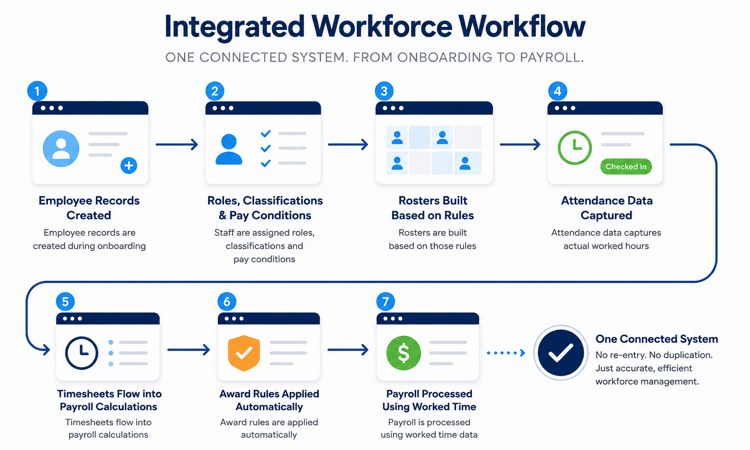
How HR and Payroll Software Work Together
In an integrated workforce system:
- Employee records are created during onboarding
- Staff are assigned roles, classifications and pay conditions
- Rosters are built based on those rules
- Attendance data captures actual worked hours
- Timesheets flow into payroll calculations
- Award rules are applied automatically
- Payroll is processed using worked time data
Instead of manually re-entering information across multiple systems, the workflow stays connected.
The Difference Between HR Software and Payroll Software
| HR Software | Payroll Software |
|---|---|
| Employee records | Wage calculations |
| Leave management | Tax and super |
| Onboarding documents | Payslips |
| Certifications and licences | STP reporting |
| Work rights compliance | Payroll reconciliation |
| Performance workflows | Award interpretation |
Many businesses still operate these systems separately.
The issue is that disconnected systems create manual reconciliation work between HR activity and payroll processing.
Why Integrated Workforce Systems Matter
When payroll operates separately from rostering and attendance, managers often spend time:
- Correcting timesheets
- Verifying shift changes
- Recalculating overtime
- Applying penalties manually
- Fixing classification errors
- Reviewing duplicated data entries
Integrated systems reduce those correction workflows because payroll calculations are connected directly to worked operational data.
‣ Why Payroll Errors Often Start Before Payroll
A common misconception is that payroll errors are caused during payroll processing itself.
In many businesses, the errors begin much earlier.
How Disconnected Systems Create Manual Corrections
A typical disconnected workflow looks like this:
- Rosters built in one system
- Timesheets recorded somewhere else
- Payroll processed separately
- Managers manually reconcile differences
This creates operational friction because information must be checked repeatedly across systems.
For example:
- A staff member clocks out late
- Overtime thresholds change
- The timesheet differs from the roster
- Payroll staff manually investigate the discrepancy
- Corrections are made before payroll finalisation
At scale, these small corrections compound into significant admin overhead.
The Operational Cost of Duplicate Data Entry
Duplicate data entry creates several operational problems:
- Higher payroll processing time
- Increased correction workloads
- Greater compliance risk
- Reduced visibility across departments
- Inconsistent employee records
- Delayed payroll approvals
This becomes more noticeable in businesses with rotating rosters, multiple departments or award complexity.
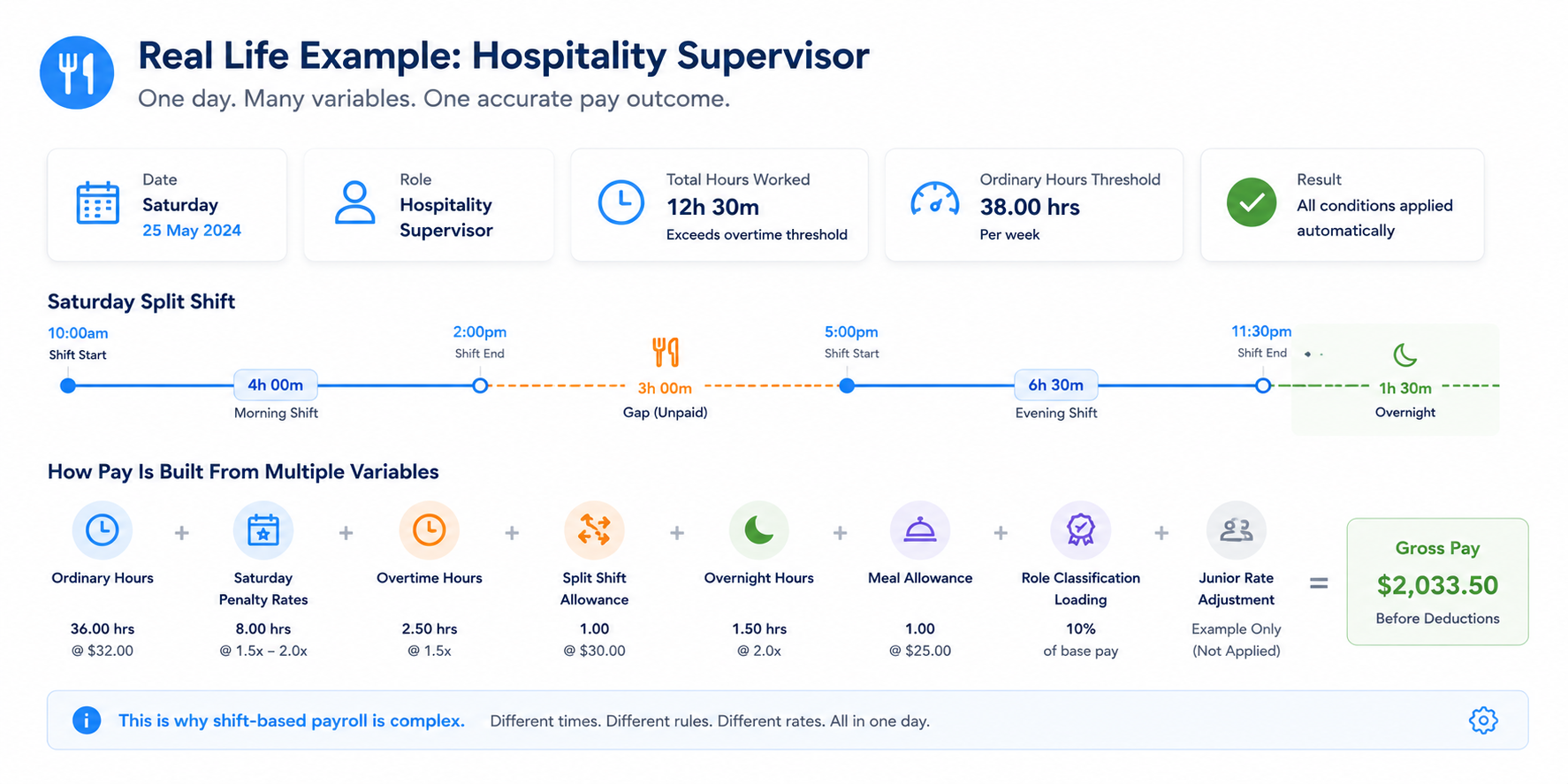
Why Shift-Based Workforces Are More Complex
Shift-based industries create payroll complexity because labour conditions change constantly.
Variables often include:
- Penalty rates
- Overtime thresholds
- Split shifts
- Overnight work
- Meal breaks
- Role classifications
- Junior rates
- Allowances
Manual payroll processes struggle when these variables are changing daily.
‣ How Integrated Rostering, Attendance and Payroll Work Together
The operational advantage of integrated workforce software is the connection between planned hours, worked hours and payroll calculations.
Roster → Timesheet → Payroll Workflow
The workflow typically follows this sequence:
| Stage | Purpose |
|---|---|
| Roster | Planned shifts and labour allocation |
| Attendance | Actual worked hours captured |
| Timesheet | Verified worked time |
| Payroll | Pay calculations and compliance |
When these systems operate together, payroll calculations reflect actual worked operational data rather than manually adjusted estimates.
How Attendance Data Flows Into Payroll
Attendance systems can capture:
- Clock in/out times
- Breaks
- Shift changes
- Department transfers
- GPS or kiosk activity
- Approved timesheet edits
That information then flows directly into payroll calculations.
This reduces reliance on manual adjustments before pay processing.
Reducing Payroll Corrections for Managers
Managers often spend significant time:
- Approving altered shifts
- Investigating missing hours
- Correcting attendance discrepancies
- Adjusting penalties manually
Integrated systems reduce those correction loops by keeping operational data connected throughout the workflow.
‣ Award Interpretation Software Explained
Award interpretation is one of the biggest operational challenges in Australian payroll.
Modern Awards can include:
- Time-based penalties
- Overtime rules
- Allowances
- Junior rates
- Industry-specific conditions
- Shift loading variations
For businesses managing large shift workforces, manual calculations quickly become difficult to scale consistently.
How Award Rules Are Applied Automatically
Award interpretation software applies payroll rules directly against timesheet and attendance data.
For example:
- A shift crosses into overtime
- Evening penalties apply
- Break rules trigger allowances
- Different classifications apply to different roles
Instead of manually calculating these conditions, the system applies rules automatically during payroll processing.
Managing Penalties, Overtime and Allowances
Payroll complexity increases significantly in industries where:
- Employees work irregular hours
- Staffing changes frequently
- Staff work across departments
- Penalty rates change throughout the day
Integrated award interpretation helps businesses maintain consistency while reducing manual recalculation work.
Industries With Complex Award Requirements
| Industry | Common Payroll Complexity |
|---|---|
| Hospitality | Penalties, split shifts, casual loading |
| Healthcare | Overnight work, overtime, classifications |
| Retail | Weekend penalties, junior rates |
| Clubs & Venues | Rotating rosters, late-night shifts |
| Pharmacies | Multiple classifications and award conditions |
‣ HR Payroll Software for Australian Industries
Hospitality
Hospitality businesses often manage:
- High staff turnover
- Casual workforces
- Rotating rosters
- Late trading hours
- Weekend penalties
Integrated payroll workflows help reduce reconciliation work between rosters, attendance and payroll.
Healthcare & Medical
Healthcare organisations commonly deal with:
- 24/7 rostering
- Overtime complexity
- Compliance documentation
- Multi-location staffing
- Award-heavy payroll conditions
Operational visibility becomes increasingly important as workforce size grows.
Retail
Retail businesses frequently require:
- Junior rate calculations
- Seasonal rostering
- Multi-department staffing
- Flexible attendance tracking
Integrated systems reduce payroll processing pressure during peak trading periods.
Clubs & Venues
Clubs and venues often manage:
- Rotating shifts
- Penalty-heavy payroll
- Event-based staffing
- Multiple operational departments
This creates significant payroll variability week to week.
Pharmacies
Pharmacies typically require:
- Role-based classifications
- Complex award interpretation
- Compliance tracking
- Consistent attendance visibility
Payroll accuracy is heavily tied to operational workforce data.
‣ What to Look For in HR Payroll Software
Not all HR payroll software is designed for operationally complex businesses.
For shift-based organisations, the most important capability is often workflow integration rather than standalone payroll processing.
Australian Compliance Support
Look for systems that support:
- STP reporting
- Modern Awards
- Superannuation compliance
- Audit visibility
- Leave management
- Employee records
Integrated Workforce Management
Disconnected tools create manual operational work.
Integrated systems reduce friction between:
- HR
- Rostering
- Attendance
- Payroll
.png?width=1000&height=300&name=Workforce%20Management%2c%20Simplified.%20(2).png)
Employee Self-Service & Mobile Access
Mobile access can help staff:
- Clock in/out
- Access payslips
- Submit leave requests
- View rosters
This reduces admin overhead for managers and payroll teams.
Scalable Payroll Operations
As businesses grow, payroll workflows become harder to manage manually.
Scalable systems should support:
- Multiple departments
- Large shift workforces
- Award interpretation
- Approval workflows
- Operational reporting
‣ Why Businesses Move Away From Separate HR and Payroll Systems
Businesses often begin with separate systems because they appear cheaper or simpler initially.
Over time, operational inefficiencies become harder to ignore.
Reducing Admin Work
Integrated systems reduce repetitive workflows like:
- Exporting data between systems
- Re-entering timesheets
- Manually checking payroll changes
- Updating employee records multiple times
Improving Payroll Accuracy
Payroll accuracy improves when:
- Rosters connect directly to payroll
- Attendance data is captured consistently
- Award rules apply automatically
- Employee data remains synchronised
Creating Better Operational Visibility
Managers gain better visibility into:
- Labour costs
- Attendance trends
- Overtime exposure
- Payroll exceptions
- Workforce utilisation
That visibility is difficult to achieve when workforce data is fragmented across multiple systems.
‣ Why Australian Businesses Use ClockOn
ClockOn is designed for Australian businesses managing operationally complex workforces.
Rather than focusing only on payroll processing, the platform connects:
- HR
- Rostering
- Attendance
- Payroll
- Award interpretation
into a single operational workflow.
Built for Australian Awards and Compliance
ClockOn supports Australian payroll requirements including:
- Modern Awards
- STP reporting
- Attendance tracking
- Audit visibility
- Award interpretation workflows
Integrated HR, Rostering, Attendance and Payroll
The platform is structured around the operational sequence that drives payroll accuracy:
Roster → Attendance → Timesheet → Payroll
This reduces disconnected workflows and manual reconciliation.
Designed for Shift-Based Workforces
ClockOn is commonly used by businesses managing:
- Shift workers
- Casual workforces
- Rotating rosters
- Penalty rates
- Overtime complexity
Supporting Businesses From 20–400 Staff
The platform is particularly suited to operationally complex mid-sized businesses that have outgrown basic payroll tools but do not want enterprise-level HR software complexity.
‣ Final Thoughts
Many payroll problems are operational workflow problems disguised as payroll problems.
When HR records, rosters, attendance and payroll systems operate separately, businesses often absorb the cost through:
- Manual corrections
- Payroll discrepancies
- Compliance risk
- Duplicate admin work
- Reduced operational visibility
Integrated workforce systems reduce that friction by connecting payroll to the operational data that creates payroll accuracy in the first place.