
A casual hospitality worker clocks in at 6 PM on a Saturday and finishes at midnight. Six hours on the timesheet.
What should happen:
Base rate → Saturday penalty → evening penalty → casual loading
What often happens:
One flat hourly rate.
That gap is where casual payroll breaks. Not because the rules are unclear. Because they’re layered, and most setups don’t reflect how Awards actually calculate pay.
If your payroll system treats casuals as a single rate with a 25% loading tacked on, you’re likely missing part of the calculation.
How casual rates actually work in Awards
Casual rates don’t sit outside the Award. They sit inside the same classification tables used for full-time and part-time employees. The difference is the casual loading, which is applied on top of the base hourly rate for that role.
The base rate itself changes depending on classification level, age, and sometimes skill-based gradings. A Level 1 retail assistant is paid differently to a Level 3. A junior employee is paid a percentage of the adult rate, and those percentages change as they get older.
| Component | What changes it | How it behaves |
|---|---|---|
| Base rate | Classification, role, age | Foundation of all calculations |
| Casual loading | Award rules, usually 25% | Added to the base rate |
| Penalties | Time worked | Applied to base rate, not loaded rate |
Once the correct base rate is identified, the casual loading is applied. After that, penalties are layered based on when the work is performed. This includes weekends, evenings, public holidays, and sometimes overnight periods.
Where payroll setups usually break
Most issues don’t come from misunderstanding the rules. They come from simplifying them too early.
A common example is setting a flat casual rate. Someone enters $28.50 per hour and assumes it covers everything. It might for one scenario, but it won’t hold across different shifts, employees, or Award conditions.
Junior rates are another failure point. A 16-year-old casual might be paid 50% of the adult base rate. At 17, that moves to 60%. At 18, 70%. At 19, 80%. These changes happen automatically based on age, but many systems don’t update them unless someone intervenes.
Time adds another layer. A shift isn’t always paid at one rate.
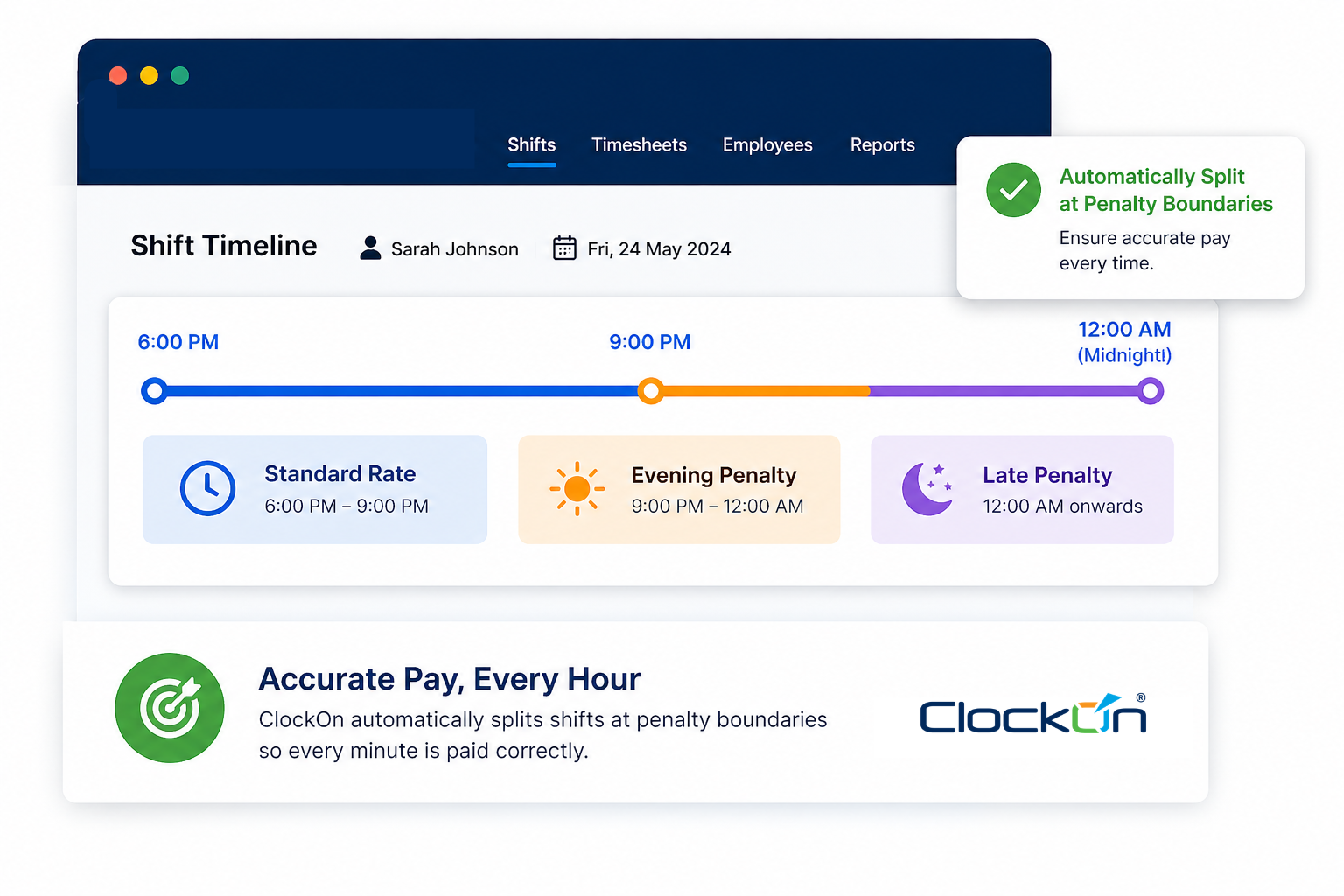
A shift from 6 PM to midnight needs to split when it crosses into an evening penalty window. If the system treats it as one block, the entire shift is calculated incorrectly.
Public holidays create a different type of issue. The structure changes depending on the Award.
| Award | Public holiday structure |
|---|---|
| Hospitality | 250% includes casual loading |
| Retail | 250% applied to base, loading added separately |
If your system applies one rule across all employees, it will be wrong somewhere.
A real shift scenario
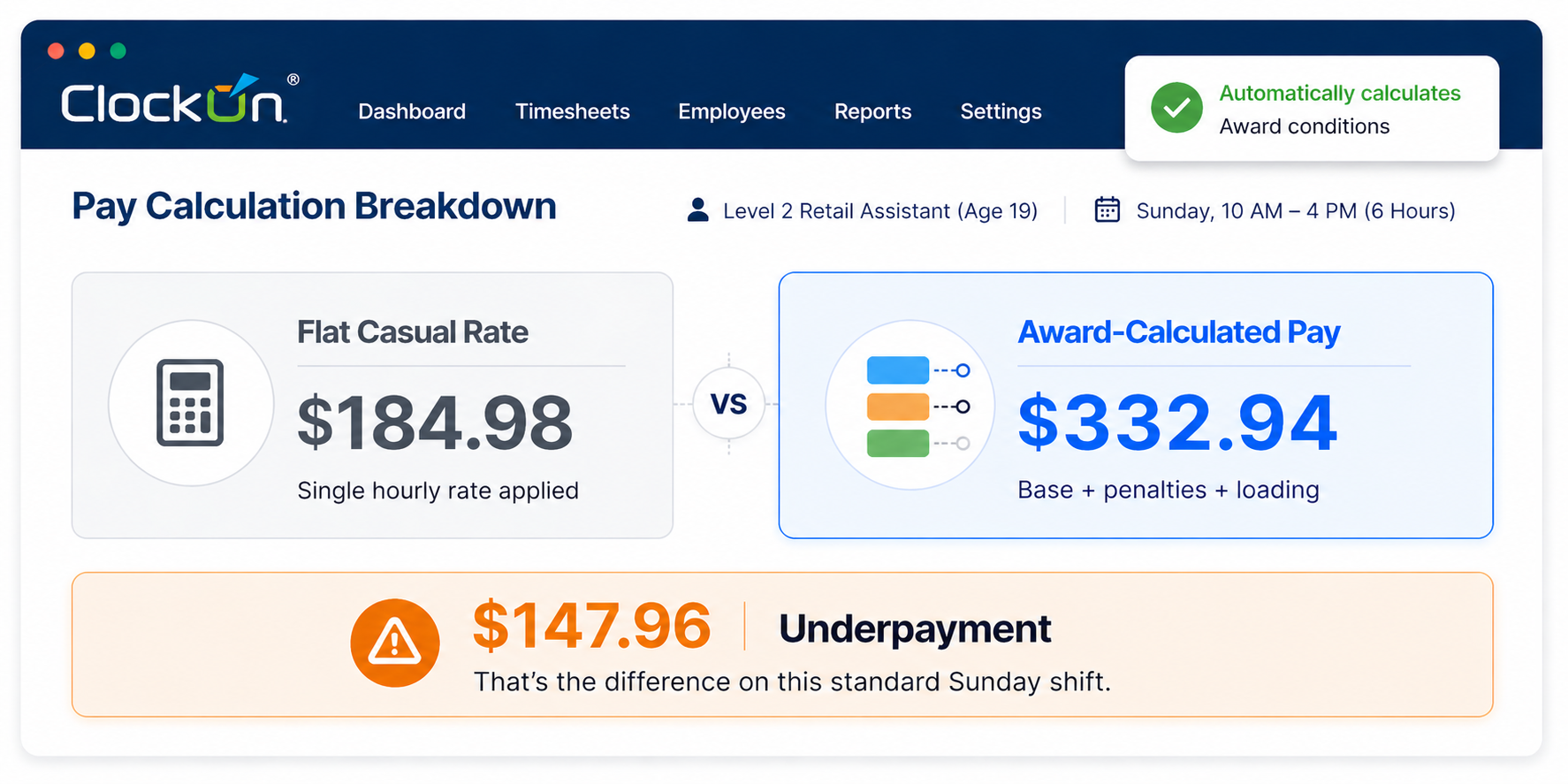
Level 2 Retail Assistant
Age: 19
Shift: Sunday, 10 AM to 4 PM
Under the General Retail Industry Award, the base hourly rate for a Level 2 is $24.66.
| Step | Calculation | Result |
|---|---|---|
| Base rate | Set by Award | $24.66 |
| Sunday penalty (200%) | $24.66 × 2 | $49.32 |
| Casual loading (25%) | $24.66 × 0.25 | $6.17 |
| Total hourly rate | $49.32 + $6.17 | $55.49 |
Correct pay for 6 hours: $332.94
Flat casual rate outcome: $184.98
Junior rates and age brackets
Junior casual rates follow the same structure, but the base rate is reduced based on age before loading is applied.
For example, if the adult base rate is $24.66:
A 17-year-old earns 60% of that base, which is $14.80. The casual loading is then applied, bringing the total to $18.50 per hour before any penalties.
If that employee works a Saturday or Sunday shift, the penalties apply to the $14.80 base rate, not the loaded figure.
This is where manual payroll setups often fail. A flat junior rate gets entered and never updated, or penalties are applied incorrectly because the system doesn’t separate base rates from loadings.
Evening and overnight penalties
Many Awards include evening penalties that begin between 6 PM and 10 PM, depending on the industry. Hospitality Awards often trigger evening rates at 9 PM. Retail and pharmacy Awards vary.
These penalties are applied as a percentage of the base rate, separate from the casual loading. If a shift crosses into a penalty window, it must be split at the correct time.
Manual systems struggle with this. They treat the shift as a single block, which means part of the shift is paid incorrectly.
Public holiday pay for casuals
Public holidays are not handled consistently across Awards. Some replace the casual loading with a higher rate. Others keep the loading and apply an additional penalty.
This difference matters. Applying the wrong structure leads to consistent overpayments or underpayments.
What payroll teams should check (checklist)
□ Correct Award coverage confirmed
□ Correct classification assigned
□ Correct pharmacist responsibility level assigned where relevant
□ Junior age-based rates checked
□ Casual rates pulled from the correct Award-based table
□ Morning, evening, and late evening penalties applied correctly
□ Saturday, Sunday, and public holiday rates checked by time band
□ Overtime triggered correctly
□ Allowances and reimbursements included
□ Current Fair Work pay guide rates in use
□ STP-ready payroll data reviewed
How payroll systems handle this
Systems that handle casual payroll properly don’t rely on fixed rates. They calculate pay dynamically based on Award data, employee details, and actual hours worked.
They separate base rates, loading, and penalties. They track time bands. They update junior rates automatically. And they adjust when Fair Work updates Award rates.
Without that structure, payroll becomes a series of manual fixes. And those fixes don’t scale.
Bottom line
Casual payroll isn’t simpler than full-time.
It just looks that way until you run the numbers properly.