
Time and attendance errors usually begin before payroll, when hours are recorded incorrectly, shift changes are missed or data is copied between disconnected systems.
For payroll managers and Australian business owners, this often means reconciling rosters, clocking records, leave, spreadsheets and manager notes before each pay run. Every manual handover adds another chance for hours to be missed, duplicated or assigned to the wrong pay category.
Payroll integration reduces that risk by connecting rostered shifts, actual attendance, approved timesheets and payroll in one workflow.
ClockOn brings rostering, time and attendance, approvals, award rules, leave and payroll together, helping managers identify and correct issues before they affect employee pay.
The connected payroll workflow: Create the roster → record actual attendance → identify exceptions → correct the timesheet → obtain manager approval → apply payroll rules → review payroll → finalise payment and reporting.
What is payroll system integration?
Payroll system integration connects payroll software with the systems that hold the information used to calculate employee pay.
Depending on the business, this may include:
- Payroll software
- Time and attendance software
- Employee rostering software
- HR software or an HR information system
- Leave management
- Accounting software
- Single Touch Payroll reporting
The aim is not simply to move a total number of hours from one product to another. A useful payroll integration should preserve enough detail for payroll staff to understand who worked, when they worked, where they worked and how those hours were classified.
▶Native payroll integration versus separate systems
A native workforce management platform keeps rostering, attendance, timesheets and payroll within the same product. Separate systems may connect through an API, scheduled synchronisation or file import.
| Integration type | How it works | Main advantage | Main risk |
|---|---|---|---|
| Native platform | Rostering, attendance, timesheets and payroll operate in one system. | Fewer handovers and a clearer record from shift to payment. | Incorrect settings can still produce incorrect results. |
| API or scheduled connection | Separate products exchange data automatically. | Can connect specialised payroll and workforce tools. | Fields, timing and correction handling may be limited. |
| File import or export | A formatted file is exported from one system and imported into another. | Removes line-by-line entry when no direct connection exists. | Version control, mapping and rejected records still require attention. |
| Manual transfer | Payroll staff re-enter information from spreadsheets, emails or paper records. | Little technical setup is required. | Higher exposure to omissions, keying errors and inconsistent classifications. |
▶What data should move from time and attendance to payroll?
A payroll and time attendance integration may transfer:
- Employee identifiers
- Start and finish times
- Paid and unpaid breaks
- Ordinary and overtime hours
- Weekend, evening and public holiday hours
- Leave taken
- Allowances and loadings
- Locations, departments and cost centres
- Approved timesheet totals
- Pay categories or earnings classifications
- Payroll journals for accounting software
Payroll managers should confirm exactly which fields move, when they move and what happens when a manager changes a timesheet after approval.
Where time and attendance errors enter payroll
A payroll calculation can be mathematically correct and still produce the wrong payment. If the source information is incomplete or misclassified, the error simply moves through the system more efficiently.
▶Rostered hours are treated as hours worked
A roster records what was planned. It does not prove what happened.
An employee may start early, finish late, cover another shift, work at a different site or take a shorter break. Payroll needs an approved record of actual attendance where pay depends on the hours or timing of work.
ClockOn allows managers to compare rostered shifts with recorded start, finish and break times. The difference appears before payroll, when it can still be investigated and corrected.
▶Hours are copied between systems
Payroll staff may receive time information from paper forms, spreadsheets, clocking software, emails and handwritten manager notes. Re-entering those hours creates a risk of transposed figures, missed employees, duplicate shifts and incorrect pay periods.
Example: A timesheet contains 38 ordinary hours and three overtime hours. Payroll enters 41 ordinary hours. The total is still 41, but the employee may be underpaid because the overtime was assigned to the wrong category.
▶Missing clock-ins and breaks are approved
Common time and attendance exceptions include:
- A missing start or finish time
- No break being recorded
- A duplicate clocking
- An unusually early start or late finish
- Leave recorded on the same day as attendance
- A shift worked at another location
- One employee replacing another
These issues are much easier to resolve before the pay run. Once payroll has been finalised, a small timesheet problem can become an adjustment, back payment, revised record and employee query.
▶Hours are assigned to the wrong pay category
The total hours may be correct while the payment is still wrong. This often occurs when ordinary hours, overtime, penalties, loadings or allowances are reconstructed manually at the end of the pay period.
ClockOn can apply configured payroll and award rules to approved time records. This supports consistent treatment of similar shifts, provided employee classifications, rates and rule settings are correct.
| Process stage | Common error | Likely payroll impact | Control |
|---|---|---|---|
| Rostering | The roster is treated as the final timesheet. | Actual shift changes are missed. | Compare rostered and recorded attendance. |
| Attendance capture | A start, finish or break is missing. | Paid hours may be understated or overstated. | Flag incomplete records before approval. |
| Timesheet approval | A manager approves an unresolved variance. | Incorrect data reaches payroll. | Require exception review before approval. |
| Pay interpretation | Hours are placed in the wrong category. | Overtime, penalties or allowances may be wrong. | Maintain classifications and configured pay rules. |
| Payroll entry | Approved hours are re-keyed incorrectly. | The employee receives the wrong payment. | Transfer approved data electronically. |
How payroll integration reduces time and attendance errors
▶It removes duplicate data entry
When approved time data flows into payroll, payroll staff do not need to type each employee’s hours again.
This removes a common source of:
- Keying and transcription errors
- Missed timesheets
- Incorrect spreadsheet formulas
- Version-control problems
- Hours entered into the wrong pay period
- Differences between attendance and payroll totals
ClockOn keeps the employee, roster, attendance record, approved timesheet and payroll result connected. Payroll can trace a figure back to its source rather than reconciling several separate documents.
.png?width=800&height=300&name=HR%20Payroll%20Software%20(800%20x%20300%20px).png)
▶It highlights roster-to-actual variances
A variance shows where recorded attendance differs from the planned shift. Examples include:
- An employee rostered for eight hours records 8.75 hours
- A break is shorter than expected
- A shift begins before an evening penalty threshold
- An employee works an unscheduled weekend shift
- An employee clocks at a different location
The variance does not decide what should be paid. It tells the manager where a decision or correction is required.
In ClockOn, these differences can be reviewed during timesheet preparation rather than being discovered after payroll has already been processed.
▶It applies configured pay rules to approved time
Once a timesheet has been checked and approved, configured rules can categorise the hours into:
- Ordinary time
- Overtime
- Weekend and public holiday penalties
- Shift loadings
- Meal, travel or other allowances
- Minimum engagements
Automated award interpretation can reduce the need for payroll staff to manually rebuild these categories for every employee. It does not remove the need to maintain correct classifications, rates and award settings.
▶It directs payroll attention to exceptions
A disconnected payroll process forces staff to inspect and enter almost every line. An integrated workflow allows routine, approved records to move through while payroll focuses on unusual results.
These may include:
- Missing clockings
- Long or short shifts
- Unexpected overtime
- Leave overlapping with attendance
- Large changes from the previous pay period
- Employees with zero hours
- Hours allocated to an unexpected location or cost centre
This is the practical value of payroll automation. It does not remove payroll review. It gives payroll staff a smaller, more relevant set of records to investigate.
▶It creates a clearer approval history
A structured workflow can show who changed or approved a timesheet and when the action occurred. This helps payroll managers answer employee questions and understand how a payment was produced.
Operational principle: Integration should reduce unnecessary handling and make exceptions easier to find. It should not allow unreviewed time records to flow straight into payroll.
How ClockOn connects time and attendance with payroll
ClockOn is designed around the full roster-to-payroll process rather than treating time tracking as a separate source file.
▶1. Build employee rosters
Managers create shifts in ClockOn Rostering, including the employee, work location, start and finish times and expected breaks.
This gives the business a planned labour record and gives payroll a baseline for later comparison.
▶2. Capture actual attendance
Employees record their start, finish and break times through the available time and attendance options.
The actual attendance record remains linked to the employee and can be compared with the rostered shift.
▶3. Review exceptions before approval
Managers can identify missing clockings, unexpected shift lengths and differences between rostered and actual hours.
Corrections happen at the point where the manager has the operational context. Payroll does not need to chase every store, department or site after the pay-period cut-off.
▶4. Approve completed timesheets
Once exceptions have been resolved, authorised managers approve the timesheets. This creates a controlled handover from operational managers to payroll.
▶5. Apply payroll and award rules
ClockOn uses the approved time records with configured employee, payroll and award settings to calculate the relevant pay categories.
This can reduce manual reconstruction of ordinary hours, overtime, penalties, loadings and allowances across employees with different classifications or work patterns.
▶6. Review and finalise payroll
Payroll staff review the completed pay run, investigate material variances and finalise payments, pay slips and reporting.
Supported payroll outputs can also be transferred to accounting platforms, reducing another round of manual journal entry.
| Payroll task | Disconnected process | ClockOn workflow |
|---|---|---|
| Capture hours | Paper, spreadsheet or separate clocking app | Attendance remains linked to the employee and roster |
| Identify changes | Managers email corrections to payroll | Roster and attendance variances can be reviewed before approval |
| Approve timesheets | Approval occurs by email or spreadsheet | Authorised managers approve in the system |
| Categorise hours | Payroll rebuilds ordinary, overtime and allowance categories | Configured rules apply to approved time |
| Enter payroll | Figures are re-keyed from other records | Approved time feeds the payroll process |
| Review payroll | Payroll reconciles several source documents | Payroll reviews exceptions and material changes |
Worked example: rostered hours versus actual attendance
Consider an employee rostered to work from 9:00 am to 5:00 pm with a 30-minute unpaid break.
| Record | Details |
|---|---|
| Rostered shift | 9:00 am–5:00 pm |
| Actual attendance | 8:52 am–5:18 pm |
| Rostered break | 30 minutes unpaid |
| Recorded break | 25 minutes unpaid |
| Variance | The recorded attendance is 31 minutes longer than the rostered paid time. |
| Manager review | Confirm whether work was performed during the additional time and whether the break is correct. |
A manual process may pay the rostered 7.5 hours without noticing the difference. A connected time and attendance payroll system presents the variance before approval.
The manager can then correct the record, document the reason and approve the completed timesheet. Payroll receives an approved result rather than an unexplained discrepancy.
What payroll integration does not fix
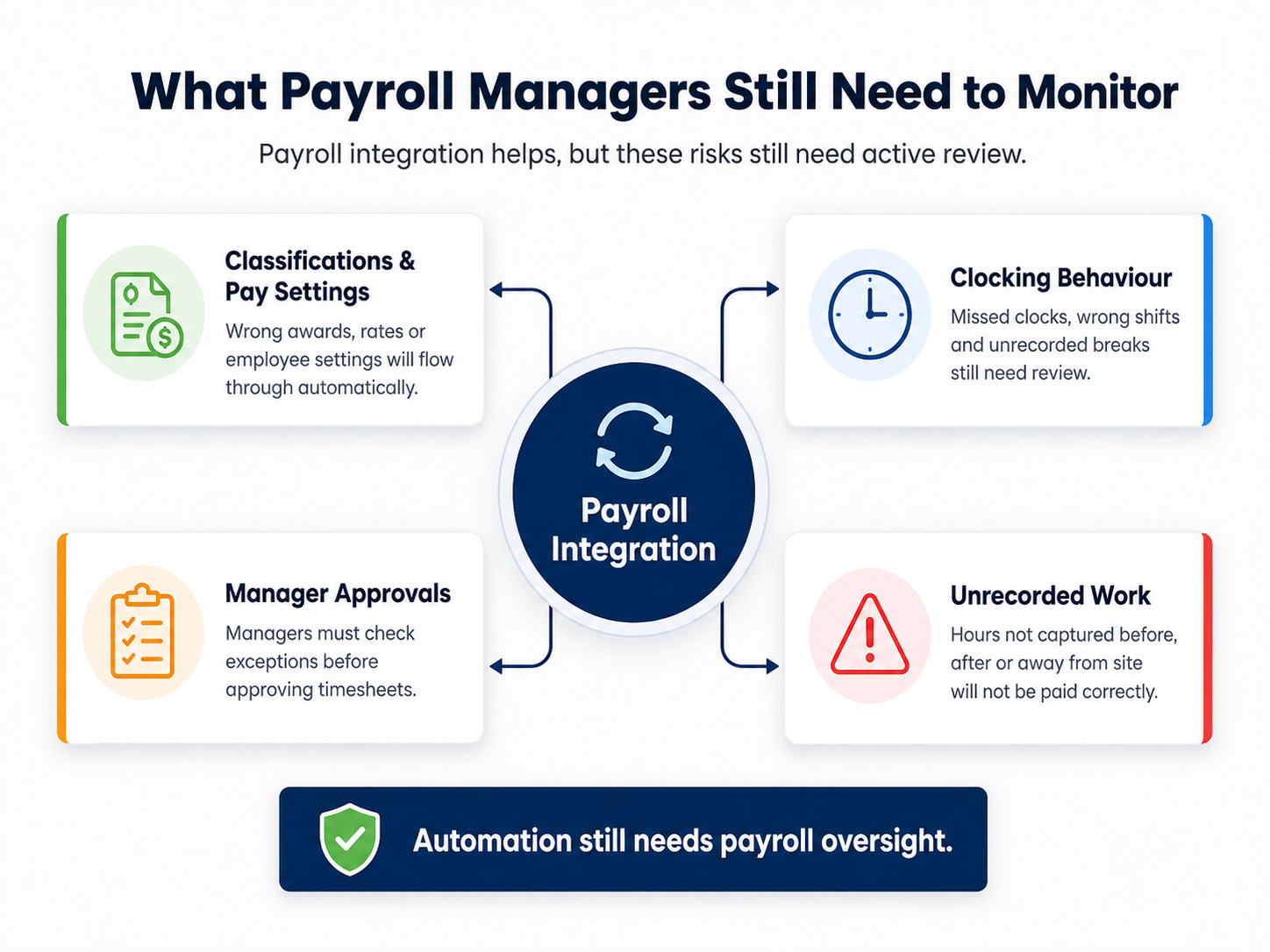
▶Incorrect employee classifications or pay settings
An automated system can apply the wrong rule consistently if the employee’s classification, employment type, pay rate or award settings are wrong.
▶Poor clocking behaviour
Employees may still forget to clock in, select the wrong shift or fail to record a break. Clear procedures and a defined correction process are still required.
▶Weak manager approvals
Automatically transferring unreviewed timesheets can make errors move faster. Managers need to understand what they are approving and which exceptions require investigation.
▶Unrecorded work
Integration cannot calculate hours that were never captured. Employers still need to address work performed before clocking in, after clocking out or away from the usual workplace.
Important: Payroll integration improves the flow and visibility of payroll data. It does not replace payroll governance, employee training or final review.
How to integrate time and attendance with payroll
▶Step 1: Map the current payroll process
Document where employee hours begin and every place they are copied, changed or approved before payment.
Include rosters, clocking tools, spreadsheets, leave records, manager emails, payroll entry and accounting journals. Repeated handovers are usually the best places to start.
▶Step 2: Define the data payroll needs
Confirm the required employee identifiers, hours, breaks, locations, cost centres, leave, pay categories, allowances and approval status.
▶Step 3: Clean employee and payroll records
Before going live, review:
- Employee identifiers
- Employment types and classifications
- Current pay rates
- Award or enterprise agreement settings
- Locations and cost centres
- Leave settings
- Payroll categories
- Manager approval assignments
▶Step 4: Configure approvals and exceptions
Define who reviews each employee, when timesheets are due and how missing clockings or disputed hours are corrected.
Payroll should also know whether an approved timesheet can be changed and how that change will be reported.
▶Step 5: Test realistic pay scenarios
Do not test only a standard weekday shift. Include:
- Full-time, part-time and casual employees
- Overtime
- Weekend and public holiday work
- Leave within the pay period
- Multiple locations or cost centres
- Allowances
- Missing clock-ins
- Timesheet corrections
- New and terminated employees
▶Step 6: Run a parallel payroll
Where practical, compare the current and integrated processes for a suitable pay cycle. Check hours, gross pay, overtime, penalties, allowances, leave, deductions, superannuation and cost allocations before relying on the new workflow.
Payroll integration checklist:
- Map all manual payroll handovers
- Confirm the data that must reach payroll
- Clean employee and pay settings
- Set manager approvals and payroll cut-offs
- Test ordinary and complex shifts
- Complete a parallel payroll comparison
- Document correction and outage procedures
- Train employees, managers and payroll staff
How payroll managers can check the integration is working
Payroll integration should reduce manual corrections and make unusual results easier to identify. It should not make the payroll process less visible. These metrics and payroll KPI's are a measure of success:
▶Track exceptions each pay period
Monitor:
- Missing clock-ins
- Unapproved timesheets
- Timesheets changed after approval
- Manual payroll adjustments
- Off-cycle payments
- Employee pay queries
- Unexpected overtime or allowance movements
Establish a baseline before implementation, then check whether unresolved exceptions and payroll corrections decline.
▶Reconcile approved hours with payroll
Compare attendance and payroll totals before finalising each pay run. Investigate employees with zero hours, unusually high hours or a material change from the previous pay period.
▶Review employee settings regularly
Promotions, transfers, birthdays, new awards, rate changes and changes in employment status can all affect payroll. Integration will not correct an employee record that has not been maintained.
| Payroll check | Warning sign | Action |
|---|---|---|
| Incomplete attendance | Missing starts, finishes or breaks remain near cut-off | Escalate to the responsible manager before approval |
| Hours reconciliation | Approved attendance and payroll totals differ | Check for rejected, duplicated or missing records |
| Pay-category movement | Unexpected overtime, penalty or allowance result | Review shifts, employee settings and configured rules |
| Employee setup | Duplicate, inactive or unmatched employee profiles | Correct records before the pay run is finalised |
Australian payroll and record-keeping considerations
Australian employers must keep accurate employee records. Fair Work guidance states that time and wages records generally need to be kept for seven years, be legible, be in English and be readily accessible to a Fair Work Inspector.
Pay slips generally need to be provided within one working day of pay day. Reporting through Single Touch Payroll does not replace an employer’s separate payroll and employment record obligations.
A connected payroll process can make it easier to retain:
- Original attendance records
- Timesheet corrections
- Approval history
- Payroll results
- Pay-rate changes
- Leave records
- Payroll adjustment reasons
- Accounting and payroll journals
Useful guidance is available from the Fair Work Ombudsman’s record-keeping information, pay-slip guidance and the Australian Taxation Office’s employment and payroll record information.
Audit trail: Roster → clocking → correction → manager approval → payroll calculation → pay slip → payroll and STP reporting.
Questions to ask when comparing payroll integration software
A product demonstration should show the full time and attendance to payroll workflow using a realistic pay period. It should include missing clockings, overtime, leave, weekend work and corrections, not only a straightforward weekday shift.
.png?width=499&height=499&name=ClockOn%20(4).png)
Things to check:
- Does the system connect rostered, recorded, approved and paid hours?
- Can managers compare rostered hours with actual attendance?
- Which employee, attendance and pay-category fields transfer?
- Can the system flag missing clock-ins, breaks and unusual shifts?
- Does it support the awards or enterprise agreements used by the business?
- Can rules differ by employee, role or location?
- Is there a visible approval and change history?
- Can approved timesheets be locked or controlled?
- How are corrections handled after payroll?
- Can payroll journals be sent to the accounting system?
- What happens when a transfer fails?
- What implementation and payroll support is available?
▶Warning signs of a weak integration
- Only total hours are transferred
- Payroll still re-enters most employee data
- Employee records must be maintained in several products
- Overtime and allowances are reconstructed manually
- Failed transfers are not clearly reported
- There is no approval or amendment history
- Approved records can be changed without visibility
- The provider cannot explain which system holds the final record
Reduce payroll errors before they reach the pay run
The most effective payroll controls often sit before payroll. Accurate attendance, visible roster variances, manager approvals and maintained pay rules give payroll staff better information to work with.
ClockOn connects these stages in one workflow:
- Employee rostering
- Start, finish and break recording
- Roster-to-attendance comparison
- Timesheet correction and approval
- Configured award and payroll rules
- Leave management
- Payroll processing and management
- Payroll outputs for supported accounting platforms
For businesses with limited internal payroll capacity, ClockOn also provides outsourced payroll services.
Integration does not guarantee that every pay run will be correct. It removes unnecessary re-entry, gives managers a clearer place to resolve attendance issues and gives payroll a more traceable set of approved records.
Review your current payroll process: Count how many times hours are copied, emailed, reformatted or re-entered between the roster and the pay run. Each handover is a potential source of error.
See how ClockOn connects rostering, time and attendance, approved timesheets and payroll.
Frequently asked questions
What is payroll integration?
Payroll integration connects payroll software with systems such as time and attendance, rostering, leave, HR or accounting software. It allows approved employee and hours data to move through the payroll process with less manual entry.
How does time and attendance integrate with payroll?
Employee start, finish and break records are reviewed, corrected and approved before being used by payroll. Depending on the system, data may move natively, through an API, by scheduled synchronisation or through a file import.
How does payroll integration reduce errors?
It reduces repeated data entry and makes roster differences, missing clock-ins, break issues and unusual hours easier to identify before payroll is finalised.
Can payroll integration calculate overtime and penalty rates?
Some systems can categorise approved time according to configured payroll, award or agreement rules. The result still depends on correct employee classifications, rates and rule settings.
Should payroll use rostered hours or actual hours worked?
A roster shows planned work. Where pay depends on attendance, payroll generally needs an accurate and approved record of the work actually performed, assessed under the applicable workplace rules.
What should payroll check before approving timesheets?
Check missing clock-ins, breaks, overtime, leave overlaps, unusual shift lengths, work locations, employee substitutions and differences between rostered and actual hours.
How does ClockOn reduce payroll data entry?
ClockOn connects the employee roster, recorded attendance, approved timesheet, configured payroll rules and pay run. This reduces the need to rebuild employee hours from separate spreadsheets, emails and clocking records.
Does payroll software guarantee Fair Work compliance?
No. Payroll software can improve consistency, visibility and record keeping, but employers remain responsible for correct classifications, pay settings, approvals, records and employee payments.
Compliance information reviewed in June 2026. This article provides general information only and does not constitute legal, payroll or workplace-relations advice. Employers should obtain advice for their specific award, enterprise agreement, workforce and payroll arrangements.