
A pharmacist calls in sick before a busy Saturday shift. A locum agrees to cover from 9:00 am to 5:00 pm, arrives early, finishes at 5:35 pm and has an approved travel reimbursement.
The shift has been covered, but the payment process has only just started. Payroll still needs to confirm who engaged the locum, check the hours actually worked, identify the correct rate and additional payments, obtain approval and record the cost against the right pharmacy or department. So what do you do?
When those details sit across text messages, paper timesheets, spreadsheets and separate payroll records, even one shift can create unnecessary work. A connected process gives each person a clear source of information from the original booking through to the final payment.
Direct locum payment occurs when a healthcare organisation engages and pays the locum itself rather than paying an agency invoice. Before processing the payment, the organisation must confirm whether the worker is an employee or genuine contractor and check the applicable tax, superannuation, award, agreement and record-keeping requirements.
What are direct locum payments?
A locum is a suitably qualified person engaged to provide temporary cover. The term describes why the person is working, not their legal status.
A locum may be:
- employed directly by the clinic, pharmacy or healthcare organisation
- engaged directly as an independent contractor
- supplied and paid by an agency
The payment channel depends on the arrangement. An employee locum is generally processed through payroll. A genuine contractor usually submits an invoice under a service agreement. An agency-supplied locum is generally paid by the agency, with the healthcare organisation paying the agency invoice through accounts payable.
An ABN, invoice or contract label does not settle the employee-versus-contractor question. Fair Work directs businesses to assess the applicable legal test and the complete relationship, including its real substance, practical reality and true nature where the whole-of-relationship test applies. See Fair Work's guidance on the whole-of-relationship test and independent contractors.
Why paying a single locum shift can become complicated
The information is often split across several systems
The booking may be confirmed by phone. The manager may add the shift to a local calendar. The locum may email their hours. The rate may sit in a contract, while the travel amount remains in a text message. Payroll then re-enters the same information and finance posts the cost to accounting.
Each hand-off creates another chance to miss a change or use the wrong record. Common outcomes include duplicate entry, delayed approvals, forgotten allowances, unapproved extra time, incorrect rates and payment records that are difficult to reconstruct later.
Implementation observation
The calculation is rarely the first point of failure. The problem usually starts earlier, when payroll cannot trace the approved hours, role, rate or allowance to one clear record. A good process fixes the hand-off before trying to automate the calculation.
The scheduled shift may not match the hours worked
Four different hour totals may exist for the same shift:
- Scheduled hours: What the locum was expected to work.
- Recorded hours: What the attendance record or timesheet shows.
- Approved hours: What the manager has authorised for payment after checking any differences.
- Paid hours: What payroll ultimately included in the pay run or contractor payment.
In the Saturday pharmacy example, the roster shows 9:00 am to 5:00 pm. The attendance record shows a 5:35 pm finish. The manager must confirm why the shift ran late, whether the additional 35 minutes were authorised and whether the applicable arrangement changes how those minutes are paid.
Paying the roster without checking the worked and approved hours may miss legitimate extra time. Paying every recorded minute without review can create a different problem. The control is a documented comparison and approval before payment.
Locum rates may contain several components
There is no universal locum rate. Depending on the engagement, profession and workplace, a payment may include ordinary hours, a casual loading, weekend or public holiday penalties, overtime, on-call or recall payments, travel costs, accommodation or an individually negotiated loading.
Each component should be linked to a documented source, such as the relevant award, enterprise agreement, employment contract or contractor agreement. Payroll should not have to recreate the arrangement from memory each time the locum works.
Decide who is responsible for paying the locum
Start by identifying the entity that engages the worker and the entity responsible for payment. This decision determines whether the payment belongs in employee payroll, contractor accounts payable or an agency invoice workflow.
| Arrangement | Who engages the locum? | Who pays the locum? | Typical payment channel | Records required | Where ClockOn can assist |
|---|---|---|---|---|---|
| Direct employee | The clinic, pharmacy or healthcare employer | The employer | Employee payroll | Employment details, tax and super information, roster, attendance, approvals, pay rules, payslip and payroll records | Rostering, attendance, timesheet approval, configured pay rules, payroll, reporting and accounting exports |
| Direct contractor | The clinic, pharmacy or healthcare organisation under a service agreement | The organisation | Accounts payable, subject to any tax or super obligations that apply | Contract, ABN details, approved service or hours, invoice, expenses and payment record | Shift scheduling, attendance evidence, approved-hour records, location and cost allocation |
| Agency-supplied locum | Usually the agency, subject to the arrangement | The agency pays the worker; the healthcare organisation pays the agency invoice | Supplier invoice through accounts payable | Booking, approved shift or service record, agency invoice and cost allocation | Scheduling, site visibility, attendance verification, approved-hour records and cost reporting |
Locums paid directly as employees
When the locum is an employee, the organisation may need to manage onboarding, a tax file number declaration, superannuation details, award or agreement coverage, PAYG withholding, payslips, Single Touch Payroll reporting and employment records.
This should not be treated as a checklist that decides legal status. The organisation should assess the complete working relationship first, then configure payroll to match the confirmed arrangement.
Is a locum an employee or contractor?
A locum can be either. The title “locum” does not decide the issue, and neither does an ABN or invoice.
A genuine independent contractor generally operates their own business and performs services under a commercial agreement. A typical payment process is to confirm the service or approved hours, match them to the contract, review the invoice and pay it through accounts payable.
An ABN does not automatically establish contractor status. A worker should not be treated as a contractor solely because they provide an ABN, submit an invoice or sign a document using the word “contractor”. Misrepresenting an employment relationship as contracting may amount to sham contracting.
If a genuine contractor does not quote an ABN, the payer may need to withhold tax unless an exception applies. The ATO explains the rules for withholding when an ABN is not provided.
Contractors who may still attract superannuation
Workplace classification is not the end of the superannuation assessment. The ATO states that some independent contractors paid mainly for their labour are treated as employees for superannuation guarantee purposes, even when they quote an ABN.
Check before payment: A contractor agreement, ABN or invoice does not automatically remove superannuation obligations. Review the ATO's guidance on super for independent contractors or obtain professional advice.
Agency-supplied locums
Under a typical agency arrangement, the agency supplies or employs the locum and pays the worker. The healthcare organisation confirms the shift or service and pays the agency's invoice.
The agency invoice should not be processed as employee payroll unless the organisation is actually the employer or payer under the arrangement. ClockOn can still be used to roster the shift, verify attendance and allocate the cost, but the supplier invoice remains an accounts payable transaction.
A step-by-step direct locum payment workflow
The following workflow is designed for directly paid locums. The exact payroll or accounts payable treatment depends on whether the locum is an employee or contractor.
| Stage | Information required | Responsible person | Approval or control | Resulting record |
|---|---|---|---|---|
| 1. Roster | Worker, role, site, date, scheduled hours, breaks and cost centre | Practice, pharmacy or roster manager | Authorised booking and agreed terms recorded | Published locum shift |
| 2. Attendance | Actual start, finish, breaks, location and changes | Locum and site manager | Source record retained | Attendance record or timesheet |
| 3. Approval | Difference between rostered, recorded and claimed hours | Authorised manager | Exceptions and expenses approved | Approved timesheet |
| 4. Interpretation | Classification, rate source, penalties, overtime and allowances | Payroll or finance | Correct rule set or contract terms confirmed | Interpreted earnings or approved invoice amount |
| 5. Review | Gross payment, tax, super, deductions and exceptions | Payroll reviewer | Pre-payroll checks completed | Approved pay run |
| 6. Payment | Net payment and required payroll records | Payroll or accounts payable | Payment authorised and statutory reporting completed | Payslip or remittance and payment record |
| 7. Accounting | Site, department, cost centre, role and service line | Finance | Posting reconciled to payroll or invoice totals | Accounting journal or supplier transaction |
Step 1: Record the shift in the roster
The roster should record the locum's name, role or qualification, location, date, scheduled start and finish, expected breaks, cost centre, approving manager and reason for the temporary cover.
A shared roster stops the booking from remaining hidden in a manager's messages or personal calendar. It also establishes the first version of the shift against which attendance and payment can be checked.
ClockOn rostering software can connect the scheduled shift with attendance and payroll records, giving managers and payroll teams a common starting point.
Step 2: Capture the hours actually worked
Attendance may be recorded through a mobile clock-in, onsite kiosk, manager-entered timesheet, imported timesheet or approved manual adjustment. The method matters less than the quality of the record.
The system should retain the actual start and finish, break details, work location, changes to the original entry and the reason for any adjustment. ClockOn time and attendance software supports mobile and kiosk clock-ins, timesheet approval and location controls such as GPS and geofencing.
For the Saturday locum, this stage records the 5:35 pm finish rather than silently replacing it with the scheduled 5:00 pm finish.
Step 3: Review and approve exceptions
The approving manager should compare the rostered hours, attendance record, claimed hours, agreed terms and any exceptional payment before payroll starts.
- Was the shift completed?
- Are the recorded start, finish and break times reasonable?
- Was the extra time requested or authorised?
- Did the locum work at a different site or in a different role?
- Is there evidence for travel, accommodation, meals or other expenses?
- Has the correct manager approved the final hours and adjustments?
In the worked example, the manager confirms that a late customer consultation required the locum to remain until 5:35 pm and approves the agreed travel reimbursement. Payroll now has an authorised record rather than two unexplained figures.
Step 4: Apply the correct rate and payment rules
Payroll should calculate the payment from confirmed information. It should not need to search old emails for the rate or ask the site manager what happened several days later.
Depending on the arrangement, the payment may involve ordinary hours, overtime thresholds, weekend or public holiday penalties, casual loading, on-call or recall provisions, travel or meal allowances, individually agreed rates or enterprise agreement conditions.
ClockOn award interpretation can be configured to apply pay rates, penalties, overtime and allowances. The employer remains responsible for confirming the correct award, agreement, classification, employment type and rule set before payroll is processed.
| Payment component | Example | Possible source of entitlement | Evidence required | Payroll treatment to verify |
|---|---|---|---|---|
| Ordinary hours | 9:00 am to 5:00 pm Saturday shift | Award, agreement or contract | Roster and approved timesheet | Classification, base rate and ordinary-hours span |
| Casual loading | Loading for a casual employee | Award, agreement or employment contract | Confirmed employment type | Whether loading is separate or included in the applicable rate |
| Weekend penalty | Saturday or Sunday hours | Award or enterprise agreement | Approved date and worked hours | Applicable multiplier and interaction with casual loading |
| Public holiday penalty | Shift worked on a public holiday | Award, agreement or contract | Shift date and work location | Relevant state or local holiday and applicable rate |
| Overtime | Hours beyond an applicable threshold | Award, agreement or contract | Approved hours and prior hours where relevant | Threshold, rate and interaction with penalties |
| On-call or recall | Locum recalled after leaving the site | Award, agreement or contract | Call record and manager approval | Minimum payment, overtime and travel provisions |
| Travel reimbursement | Agreed mileage or transport cost | Contract, policy, award or agreement | Receipt, distance record or approved claim | Allowance versus reimbursement and tax treatment |
| Accommodation | Hotel for a regional locum | Contract, policy, award or agreement | Invoice, receipt and prior approval | Reimbursement, allowance, GST or fringe benefits treatment |
| Manual adjustment | Correction for a missed 35 minutes | Approved adjustment | Original record, reason and approver | Correct pay period and audit trail |
Complete a pre-payroll check
Before creating the pay run, use the same checks for every directly employed locum. This makes unusual payments visible while there is still time to correct them.
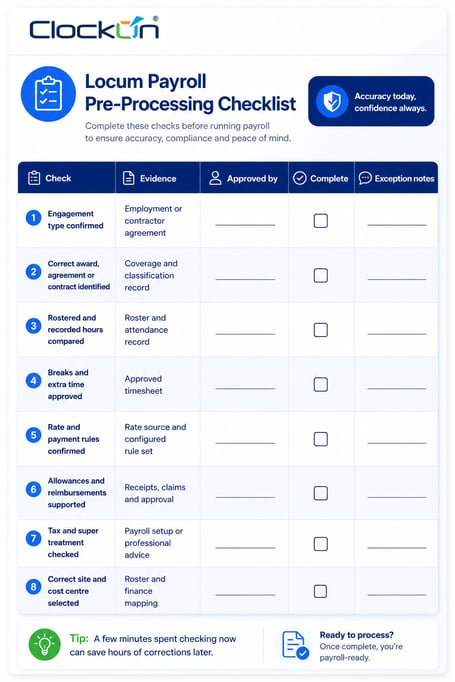
Step 5: Create and review the pay run
Approved timesheet data can reduce the re-entry of employee details, dates, hours, earning categories, locations, cost centres and adjustments. Timesheet payroll software creates a clearer link between the hours approved by the manager and the earnings reviewed by payroll.
Automation does not remove the need for review. Before finalising the run, payroll should:
- compare total hours with approved timesheets
- review unusually high or low gross payments
- check weekend and public holiday shifts
- confirm one-off allowances and reimbursements
- look for duplicate shifts or earnings
- verify the tax and superannuation treatment
- confirm the pay period and payment date
Payroll management controls should make exceptions easier to see, not simply process every entry without question.
Step 6: Issue the payment and payroll records
For employee locums, the final process may include a payslip, PAYG withholding, Single Touch Payroll reporting, superannuation, a bank or ABA payment file and payroll reports.
Fair Work requires employers to provide employees with a payslip within one working day of payment. ClockOn payroll software supports wage calculations, PAYG, superannuation, deductions, payslips and STP reporting.
For a genuine contractor, the payment record is usually the approved invoice and remittance processed through accounts payable, subject to any withholding, superannuation or GST requirements that apply.
Step 7: Transfer the cost to accounting
Finance may need to allocate the locum cost by site, department, cost centre, role, shift or service line. That coding should be captured early rather than added after payroll when the context is harder to confirm.
ClockOn supports Xero and MYOB integrations for payroll journals and timesheet costings. This can reduce the need to re-key processed payroll information into the accounting system and makes reconciliation easier.
Which award or agreement applies to an employee locum?
A temporary employee is not automatically award-free. Coverage depends on the employer, workplace, occupation, duties, classification and any applicable enterprise agreement or public-sector instrument.
The examples below are starting points only. Employers should check the current award text, pay guide and coverage rules before processing the shift.
| Worker or workplace | Potential award | Important exclusions or limits | What the employer must verify |
|---|---|---|---|
| Pharmacist, intern or pharmacy assistant in a community pharmacy | Pharmacy Industry Award | Does not cover every hospital, government or non-community pharmacy arrangement | Community pharmacy definition, classification, employment type, minimum engagement, ordinary hours, penalties, overtime and allowances |
| Employed medical practitioner in a covered workplace | Medical Practitioners Award | Coverage is tied to listed employers and workplaces; not every temporary doctor or private GP arrangement is covered | Employer and workplace coverage, classification, seniority, agreement coverage and contractual terms |
| Health professional or support employee in private health services | Health Professionals and Support Services Award, shown by Fair Work as the Health Services Award | Does not cover medical practitioners covered elsewhere or nurses covered by the Nurses Award | Employer's industry, occupation, classification, duties and any enterprise agreement |
| Employee nurse or midwife | Nurses Award | Public-sector, state and enterprise agreement arrangements may apply instead | Workplace coverage, role, classification, pay point, penalties, overtime and current operative rates |
| Hospital or larger healthcare organisation | Modern award, enterprise agreement, public-sector award or state industrial instrument | A Modern Award may not be the operative instrument | Employer coverage, agreement coverage, state or federal system and individual contract interaction |
Community pharmacy locums
The Pharmacy Industry Award covers employers in the community pharmacy industry and employees within its classifications, including pharmacists, pharmacy interns, pharmacy students and pharmacy assistants.
Coverage should still be checked against the actual business and role. A hospital pharmacy, public-sector service or other arrangement may operate under a different award, agreement or industrial instrument.
Pharmacy payroll teams should also check the operative date of current rates. Minimum rates for pharmacists and pharmacy interns under the Pharmacy Award are being increased in stages on 30 June 2025, 30 June 2026 and 30 June 2027. The 2026 Annual Wage Review also changes minimum award rates from the first full pay period starting on or after 1 July 2026. Use the current Fair Work pay guide at the time of payment.
Medical practitioners
The Medical Practitioners Award covers medical practitioners employed in specified settings, including certain hospitals, hospices, day procedure centres, Aboriginal health services and community health centres. It also lists particular classifications, from interns and registrars through to specialists and directors of medical services.
Do not assume every doctor working temporarily is covered. Private practice arrangements, public-sector employment, enterprise agreements and individual contracts may produce a different result.
Health professionals and practice staff
The Health Professionals and Support Services Award can cover classified support employees and health professionals in private health services, including some pharmacists, physiotherapists, psychologists, dental employees, medical receptionists and administrative staff.
The award does not cover every person working in healthcare. Doctors, GPs, surgeons and nurses may be covered by different instruments.
Nurses and midwives
Employee nurses and midwives may be covered by the Nurses Award, depending on the workplace and any applicable agreement or public-sector arrangement.
Some registered and enrolled nurses working in aged care have an additional minimum-rate increase scheduled for the first full pay period starting on or after 1 August 2026. Fair Work states that final determinations will be published closer to that date. Check the current Nurses Award rate change guidance immediately before processing affected shifts.
Enterprise agreements and public-sector arrangements
Hospitals and larger healthcare employers may operate under enterprise agreements, public-sector awards or state-based industrial instruments. A payroll process that assumes every locum is covered by a Modern Award can apply the wrong rates and conditions.
Record the coverage decision alongside the worker's classification and rate source so payroll can see why a particular rule set was used.
What records should be kept for locum payments?
The organisation should be able to explain how the final amount was determined without relying on a manager's memory or an incomplete email chain.
Useful records include:
- the employment, contractor or agency agreement
- the worker classification or engagement decision
- the original rostered shift
- actual attendance and breaks
- the timesheet or service record
- manager approvals
- the source of the rate and payment rules
- expense claims and supporting evidence
- payroll calculations or contractor invoices
- payslips, STP and superannuation records where applicable
- the accounting journal or supplier transaction
- corrections, reasons and approval history
For employees covered by Commonwealth workplace laws, Fair Work generally requires time and wage records to be retained for seven years and payslips to be issued within one working day of payment. See Fair Work's record-keeping and pay slips fact sheet.
Payroll compliance tools can help maintain the records used to review and explain a payment, but the employer remains responsible for the accuracy and completeness of those records.
Create an audit trail for adjustments
Any change to a locum timesheet or payment should show what changed, who changed it, when it changed, why it changed and who approved the final amount.
For example, a manager compares the Saturday attendance record with the approved shift note and adds a missed 35 minutes. The final record should preserve the original entry, the adjustment reason and the approval rather than simply replacing 5:00 pm with 5:35 pm.
Common locum payment mistakes
| Common mistake | Operational or compliance risk | Recommended control | System support |
|---|---|---|---|
| Assuming an ABN automatically means contractor | The worker may be misclassified and employee or superannuation obligations may be missed | Assess the complete relationship and check superannuation separately | Store the confirmed engagement type and supporting agreement |
| Paying the roster instead of approved hours | Extra time, early starts, late finishes or break changes may be missed | Compare scheduled, recorded, claimed and approved hours | Roster-to-timesheet variance and manager approval |
| Using one rate for every shift | Weekend, public holiday, overtime, on-call or location rules may be applied incorrectly | Trace each earning rule to an award, agreement or contract | Configured rate sets, earning categories and interpretation rules |
| Leaving allowances in emails or text messages | Approved costs may be missed or paid without evidence | Use a defined claim and approval process | Allowance categories, attachments, notes and approval history |
| Re-entering the same shift into several systems | Dates, hours, locations and amounts may no longer match | Use a connected workflow or controlled integration | Shared roster, attendance, payroll and accounting data |
| Processing an agency invoice through employee payroll | The supplier cost may be recorded through the wrong channel | Confirm which entity engages and pays the worker | Separate payroll and supplier workflows with consistent cost allocation |
| Treating software as the legal decision-maker | The system may consistently apply the wrong classification or rule set | Confirm legal coverage and configuration before processing | Configuration controls, review reports and access restrictions |
How to evaluate a locum payment system
Start with the actual hand-offs in your current process. Mark every point where the same shift is entered, checked or approved again. Those are the places where a connected system should remove work or create a clearer control.
A suitable system should allow the organisation to:
- roster workers across multiple sites
- record roles, locations, departments and cost centres
- capture actual attendance and breaks
- compare rostered and worked hours
- route timesheets and exceptions for approval
- configure rates, earning categories and relevant pay rules
- record allowances, reimbursements and manual adjustments
- create payroll from approved information
- produce payslips and STP records
- retain change and approval history
- export payroll costs to accounting
- restrict access to confidential tax, bank and payroll information
- produce reports for payroll review and audit preparation
| Requirement | Current process | Manual steps | System capability | Remaining control required | Priority |
|---|---|---|---|---|---|
| Record and publish locum shifts | High / Medium / Low | ||||
| Capture actual start, finish and breaks | High / Medium / Low | ||||
| Approve variances and expenses | High / Medium / Low | ||||
| Apply configured rates and earning rules | High / Medium / Low | ||||
| Create and review payroll | High / Medium / Low | ||||
| Transfer costs to accounting | High / Medium / Low | ||||
| Retain records and change history | High / Medium / Low |
How ClockOn connects the locum shift to payroll
ClockOn brings rostering, time and attendance, award interpretation and payroll into one system. For a directly employed locum, the operational sequence is:
- Add the locum or temporary employee to the roster.
- Record the agreed site, role, shift and cost centre.
- Capture or enter the actual attendance.
- Review and approve the timesheet and any exceptions.
- Apply the configured earning and pay rules.
- Create and review payroll.
- Issue the payslip and complete STP reporting where required.
- Send payroll journals or timesheet costings to Xero or MYOB.
This reduces the number of times the same shift must be entered and gives payroll a clearer link between what was scheduled, what happened, what was approved and what was paid.
There are two important limits:
- ClockOn does not determine whether a locum is legally an employee or contractor.
- The employer must confirm the applicable award, agreement, classification, rate, tax and superannuation treatment before configuring payroll.
The software applies the information and rules configured in it. It does not replace employment, tax, payroll or legal advice.
When outsourced payroll may be appropriate
Some healthcare employers have the right workforce data but lack the internal capacity to administer and review payroll consistently. Outsourced processing may be worth considering when the organisation has:
- no dedicated payroll specialist
- frequent temporary, casual or locum staff
- multiple awards or enterprise agreements
- several clinics, pharmacies or operating sites
- limited time for pre-payroll review
- regular corrections or employee payment queries
- key-person dependency in payroll
- upcoming changes such as new award rates or Payday Super
ClockOn's outsourced payroll services use the same connected rostering, attendance and payroll data while an Australian payroll team administers the pay run. The employer still needs to provide correct engagement details, approvals and supporting records.
Direct locum payment checklist
- □ Confirm who engages and pays the locum.
- □ Determine whether the arrangement is employment, genuine contracting or agency supply.
- □ Check superannuation treatment separately.
- □ Identify the applicable award, agreement, public-sector instrument or contract.
- □ Record the shift in a shared roster.
- □ Capture actual hours and breaks.
- □ Approve exceptions before payroll or invoice payment.
- □ Confirm the rate and every additional payment.
- □ Review the payroll calculation or contractor invoice.
- □ Issue the required payment and payroll records.
- □ Reconcile the cost to accounting.
- □ Retain the supporting records.
- □ Document corrections and approval history.
Move from manual locum payments to a connected workflow
Direct locum payments are easier to control when the roster, attendance record, approval and payroll calculation use the same underlying information.
The practical first step is to map one recent locum shift. Write down where the booking, hours, rate, allowance, approval, payment and accounting entry were recorded. Any detail entered twice or approved outside the main process is a likely source of delay or error.
ClockOn helps clinics, pharmacies and healthcare employers reduce the manual work between a locum accepting a shift and receiving a documented payment. It connects rosters, approved hours, configured pay rules, payroll reporting and accounting exports without claiming to make the legal classification decision for the employer.
Frequently asked questions
How do you pay a locum directly?
Confirm whether the locum is an employee or genuine contractor, record and approve the work performed, apply the correct rate, tax and superannuation treatment, then process the payment through payroll or accounts payable as appropriate.
Is a locum an employee or independent contractor?
A locum can be either. The title “locum”, an ABN or an invoice does not determine status. The organisation must assess the contract and actual working relationship under the applicable legal tests.
Do employers have to pay superannuation for locums?
Employee locums will generally attract superannuation obligations. Some contractors paid mainly for their labour may also be treated as employees for superannuation guarantee purposes. Check current ATO guidance or obtain professional advice.
Which award applies to a locum pharmacist?
An employee locum working in a community pharmacy may be covered by the Pharmacy Industry Award. Hospital, public-sector, contractor and enterprise agreement arrangements may differ, so coverage and classification must be checked.
Should a locum submit a timesheet or an invoice?
Employees ordinarily have attendance and timesheet records processed through payroll. Genuine contractors commonly submit an invoice under their service agreement. Agency-supplied locums are generally paid by the agency.
Can locum timesheets flow directly into payroll?
Yes. An integrated workforce system can use approved timesheet information as the basis for payroll. Payroll should still review rates, exceptions, tax, superannuation and adjustments before finalisation.
What records should be kept for locum payments?
Keep the engagement agreement, roster, attendance, timesheet, approvals, rate evidence, expense records, payroll calculation or invoice, payslip, superannuation records and any correction history. Employee time and wage records generally need to be retained for seven years.
Important: This article provides general information only. Employment status, award coverage, tax, GST, superannuation and payment obligations depend on the facts of each arrangement. Obtain professional advice where the correct treatment is uncertain.