
A part-time registered nurse is rostered from 2.00 pm to 10.00 pm on Friday. The shift runs until 12.20 am Saturday, the meal break is interrupted, and the nurse completes a clinical call after leaving the workplace.
That one shift can create several payroll questions. Which hours attract the afternoon loading? Which hours fall on Saturday? When does overtime begin? Does the interrupted break change the payment? Does the later call trigger a recall minimum?
When the roster, clock times, break records and payroll are managed separately, those questions become manual hand-offs. Small details are re-entered, unusual shifts are handled through notes, and payroll depends on someone recognising every exception before the pay run closes.
This guide explains how the Nurses Award 2020 (MA000034) works in practice for payroll. It covers current 2026–27 minimum rates, classifications, shift penalties, overtime, on-call work, recall, breaks, allowances and leave. It also explains how ClockOn can connect Award settings, rostering, time and attendance, timesheet review and payroll in one controlled workflow.
Nursing payroll depends on the details behind each shift: the employee’s classification, rostered hours, actual attendance, breaks and any exceptions recorded before payroll.
What is the Nurses Award 2020?
The Nurses Award 2020 is the national Modern Award identified by the code MA000034. It sets minimum employment conditions for covered nursing employees, including minimum rates, ordinary hours, rostering, overtime, shiftwork, weekend work, allowances and leave-related payments.
It is an occupational Award. That means coverage can follow the nursing work performed, not only the employer’s main industry.
Coverage starts with the industrial instrument
The first payroll question is not “What is the hourly rate?” It is “Which industrial instrument covers this employee?”
| Workplace or role | Typical position | What payroll should confirm |
|---|---|---|
| Private hospital, day surgery or medical clinic nurse | The Nurses Award may apply | Employer coverage, nursing duties and any enterprise agreement |
| Registered or enrolled nurse working in aged care | The aged care stream of the Nurses Award may apply | Aged care status, classification and current rate structure |
| Nursing assistant providing aged care or home care services | Generally excluded from MA000034 | Whether the Aged Care Award or SCHADS Award applies |
| Nurse employed by a primary or secondary school | Excluded from the Nurses Award | The alternative Award or agreement |
| Public hospital nurse | Often covered by a state instrument or enterprise agreement | The employer and jurisdiction-specific instrument |
| Agency or on-hire nurse | The Nurses Award may apply | The host environment and whether another classification is more appropriate |
Coverage errors flow through the entire payroll. If the wrong instrument is selected, the base rate, penalties, overtime triggers, leave settings and allowances may all be wrong even when the arithmetic is accurate.
Job title alone does not determine the rate
“Registered Nurse” is not a complete payroll classification. The employee may also need a level, pay point or increment, employment type, aged care status and effective date.
The Award includes classifications for:
- Nursing assistants
- Student enrolled nurses
- Enrolled nurses
- Registered nurses at levels 1 to 5
- Nurse practitioners
- Occupational health nurses
- Senior occupational health clinical nurses
Some classifications progress through several pay points. Others use grades or experience-based increments. The aged care stream has its own structure.
For employees outside aged care, progression through a classification with multiple pay points is generally by annual movement for full-time employees or after 1,786 hours of experience for part-time and casual employees. Progression also has regard to the skills used and knowledge gained in the relevant practice setting.
If payroll stores only a generic nursing title, a nurse can remain attached to an outdated rate long after a progression review should have occurred.
Nurses Award pay rates for 2026–27
The tables below show minimum base rates. They do not replace the complete Fair Work pay guide, which also contains casual, shift, weekend, public holiday and overtime amounts.
Nursing assistants and enrolled nurses other than aged care employees
| Classification | Minimum weekly rate | Minimum hourly rate |
|---|---|---|
| Nursing assistant — 1st year | $1,050.70 | $27.65 |
| Nursing assistant — 2nd year | $1,067.30 | $28.09 |
| Nursing assistant — 3rd year and thereafter | $1,084.40 | $28.54 |
| Experienced nursing assistant with relevant Certificate III | $1,119.10 | $29.45 |
| Student enrolled nurse — under 21 | $976.20 | $25.69 |
| Student enrolled nurse — 21 and over | $1,024.70 | $26.97 |
| Enrolled nurse — pay point 1 | $1,139.90 | $30.00 |
| Enrolled nurse — pay point 2 | $1,155.00 | $30.39 |
| Enrolled nurse — pay point 3 | $1,170.40 | $30.80 |
| Enrolled nurse — pay point 4 | $1,187.20 | $31.24 |
| Enrolled nurse — pay point 5 | $1,199.20 | $31.56 |
Registered nurse level 1 rates
| Pay point | Minimum weekly rate | Minimum hourly rate |
|---|---|---|
| Pay point 1 | $1,219.50 | $32.09 |
| Pay point 2 | $1,244.50 | $32.75 |
| Pay point 3 | $1,275.00 | $33.55 |
| Pay point 4 | $1,309.00 | $34.45 |
| Pay point 5 | $1,349.20 | $35.51 |
| Pay point 6 | $1,388.10 | $36.53 |
| Pay point 7 | $1,428.30 | $37.59 |
| Pay point 8 and thereafter | $1,465.50 | $38.57 |
A four-year degree entry rate is $1,273.40 per week or $33.51 per hour, with progression to registered nurse level 1 pay point 4. A master’s degree entry rate is $1,317.20 per week or $34.66 per hour, with progression to pay point 5.
Registered nurse levels 2 to 5
| Classification | Minimum weekly rate | Minimum hourly rate |
|---|---|---|
| Registered nurse level 2 — pay point 1 | $1,504.40 | $39.59 |
| Registered nurse level 2 — pay point 2 | $1,528.30 | $40.22 |
| Registered nurse level 2 — pay point 3 | $1,554.80 | $40.92 |
| Registered nurse level 2 — pay point 4 and thereafter | $1,580.30 | $41.59 |
| Registered nurse level 3 — pay point 1 | $1,631.20 | $42.93 |
| Registered nurse level 3 — pay point 2 | $1,661.10 | $43.71 |
| Registered nurse level 3 — pay point 3 | $1,689.80 | $44.47 |
| Registered nurse level 3 — pay point 4 and thereafter | $1,720.10 | $45.27 |
| Registered nurse level 4 — grade 1 | $1,861.70 | $48.99 |
| Registered nurse level 4 — grade 2 | $1,995.10 | $52.50 |
| Registered nurse level 4 — grade 3 | $2,111.60 | $55.57 |
| Registered nurse level 5 — grade 1 | $1,878.60 | $49.44 |
| Registered nurse level 5 — grade 2 | $1,978.40 | $52.06 |
| Registered nurse level 5 — grade 3 | $2,111.60 | $55.57 |
| Registered nurse level 5 — grade 4 | $2,243.10 | $59.03 |
| Registered nurse level 5 — grade 5 | $2,474.10 | $65.11 |
| Registered nurse level 5 — grade 6 | $2,706.90 | $71.23 |
Nurse practitioners and occupational health nurses
| Classification | Minimum hourly rate |
|---|---|
| Nurse practitioner — 1st year | $49.39 |
| Nurse practitioner — 2nd year | $50.86 |
| Occupational health nurse level 1 — pay points 1 to 5 | $34.45 to $38.57 |
| Occupational health nurse level 2 — pay points 1 to 4 | $39.59 to $41.59 |
| Senior occupational health clinical nurse | $41.59 |
| Occupational health nurse level 3 — pay points 1 to 4 | $42.93 to $45.27 |
Aged care nursing rates from 1 August 2026
Eligible enrolled and registered nurses working in aged care receive a further increase from the first full pay period starting on or after 1 August 2026.
| Aged care classification | Minimum weekly rate | Minimum hourly rate |
|---|---|---|
| Enrolled nurse supervising other direct care employees | $1,542.00 | $40.58 |
| Registered nurse level 1 — first year at this level | $1,571.60 | $41.36 |
| Registered nurse level 1 — more than 1 year and up to 4 years | $1,654.30 | $43.53 |
| Registered nurse level 1 — more than 4 years | $1,801.10 | $47.40 |
| Registered nurse level 2 — first 3 years at this level | $1,947.70 | $51.26 |
| Registered nurse level 2 — more than 3 years | $2,046.00 | $53.84 |
| Registered nurse level 3 | $2,094.20 | $55.11 |
| Registered nurse level 4 | $2,390.30 | $62.90 |
| Registered nurse level 5 | $2,711.30 | $71.35 |
Student enrolled nurse aged care rates remain structured by age. From 1 July 2026, the minimum hourly rate is $29.54 for an employee under 21 and $31.01 for an employee aged 21 or over.
Aged care nurse practitioner rates from 1 July 2026 are $56.81 per hour in the first year and $58.49 per hour in the second year.
Translation arrangements may preserve a higher earlier minimum for some existing aged care nurses. Payroll should not assume that moving an employee to the simplified current classification automatically means replacing a protected higher rate.
Full-time, part-time and casual nursing payroll
Full-time employees
A full-time employee works 38 hours per week or an average of 38 hours under the permitted roster cycle. Ordinary hours may be arranged as 38 hours per week, 76 hours per fortnight or 152 hours over 28 days.
The maximum ordinary shift length is generally 10 hours, excluding meal breaks. An accrued day off system may also be used where the arrangement meets the Award requirements.
Part-time employees
A part-time employee works less than an average of 38 ordinary hours per week and has reasonably predictable hours. Before employment starts, the employer and employee should record the guaranteed minimum hours and the rostering arrangements applying to those hours.
Part-time payroll problems often begin when the written arrangement, roster and actual work pattern stop matching. A nurse may regularly accept additional shifts, stay beyond the rostered finish or work a different pattern across the fortnight. Those hours need to be assessed against the Award rules rather than automatically paid as ordinary time.
Casual employees
Casual employees receive a 25% loading on the minimum hourly rate for ordinary hours. They also receive a minimum of two hours’ pay for each engagement.
Short clinical sessions are where the minimum engagement is easily missed. A nurse may attend for a brief vaccination clinic, handover, assessment or procedure, but the payroll result still needs to recognise the applicable minimum payment.
Casual loading does not remove shift, weekend, public holiday or overtime obligations. The calculation base changes depending on the payment being applied.
Shift penalties, weekends and public holidays
Nursing payroll is highly sensitive to when work occurs. A single shift can move through weekday shiftwork, weekend ordinary hours and overtime.
| Work period | Full-time and part-time treatment | Casual treatment |
|---|---|---|
| Weekday afternoon shift | 112.5% of the minimum hourly rate | 137.5% of the minimum hourly rate |
| Weekday night shift | 115% of the minimum hourly rate | 140% of the minimum hourly rate |
| Saturday ordinary hours | 150% of the minimum hourly rate | 150% of the casual hourly rate |
| Sunday ordinary hours | 175% of the minimum hourly rate | 175% of the casual hourly rate |
| Public holiday ordinary hours | 200% of the minimum hourly rate | 200% of the casual hourly rate |
An afternoon shift generally starts no earlier than noon and finishes after 6.00 pm on the same day. A night shift generally starts at or after 6.00 pm and finishes before 7.30 am the following day.
Weekday shift loadings do not stack on top of the weekend or public holiday rate. The applicable treatment changes according to the hours worked.
Cross-midnight shifts need time-based assessment
Consider a registered nurse rostered from 6.00 pm Friday to 2.00 am Saturday.
| Time worked | Payroll issue |
|---|---|
| Friday evening before midnight | Weekday night-shift treatment may apply |
| Saturday after midnight | Saturday ordinary-hours treatment may apply |
| Time beyond the rostered or ordinary shift limit | Overtime must be assessed |
| Break differs from the roster | The actual break record may change paid time |
Applying one rate to the entire shift can miss the point at which the payroll treatment changes.
Overtime rates
| Overtime period | Full-time and part-time | Casual |
|---|---|---|
| Monday to Saturday — first 2 hours | 150% of the minimum hourly rate | 150% of the casual hourly rate |
| Monday to Saturday — after 2 hours | 200% of the minimum hourly rate | 200% of the casual hourly rate |
| Sunday overtime | 200% of the minimum hourly rate | 200% of the casual hourly rate |
| Public holiday overtime | 250% of the minimum hourly rate | 250% of the casual hourly rate |
Overtime replaces the shiftwork loading or weekend penalty rather than being added on top of it.
Registered nurse levels 4 and 5 require separate payroll treatment because the Award’s standard overtime and weekday shiftwork provisions do not apply to them in the same way. This is exactly the type of classification difference that should be reflected in the employee’s rule set rather than handled through memory at payroll.
On-call, recall and work performed after leaving
On-call and recall are related, but they are not the same payment.
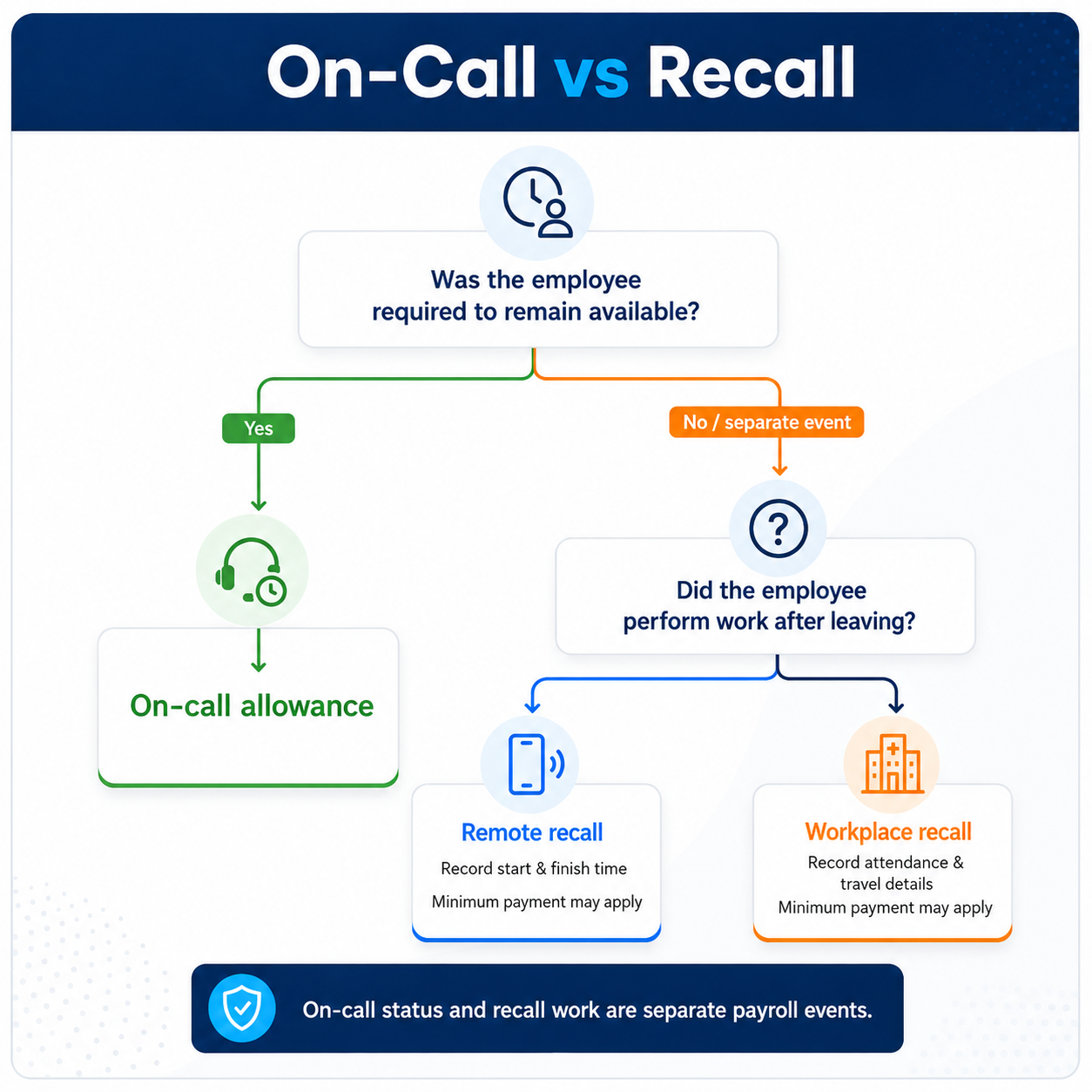
On-call status, remote work and a return to the workplace are separate payroll events. Each needs the correct record before the applicable allowance or minimum payment can be assessed.
On-call allowances
An on-call allowance applies where the employee is required to remain on call at their private residence or another agreed place.
| On-call period | Allowance per 24-hour period or part |
|---|---|
| Monday to Friday | $28.66 |
| Saturday | $43.17 |
| Sunday, public holiday or non-rostered day | $50.37 |
Recall to the workplace
An employee recalled to the workplace after leaving is generally entitled to a minimum of three hours at the applicable overtime rate. The employee is not required to remain for the full three hours when the work is completed sooner, but the minimum payment still matters.
Remote recall by phone or electronic communication
Work performed away from the workplace by telephone or electronic communication generally attracts a minimum of one hour at the applicable overtime rate. Multiple requests completed within the same hour are treated within that one-hour minimum. Time beyond the first hour is rounded to the nearest 15 minutes.
| Event | Potential payroll outcome | Record needed |
|---|---|---|
| Employee placed on call | On-call allowance | Day and period of on-call duty |
| Short clinical call completed from home | Remote recall minimum may apply | Start, finish and recall type |
| Employee returns to the facility | Workplace recall minimum may apply | Attendance and travel information |
| Several calls occur within one hour | May form part of one minimum payment | Each contact and total time worked |
Recall work is often missed because it does not look like a normal rostered shift. It may sit in a message thread, phone log or manager note rather than the time record used by payroll.
Breaks and rest between nursing shifts
Meal breaks
An employee working more than five hours is generally entitled to an unpaid meal break of 30 to 60 minutes. Where reasonably practicable, it is taken between the fourth and sixth hour after work starts.
An individual employee working a shift of six hours or less may agree to forfeit the meal break.
The payroll result changes when the employee cannot take the break as planned:
- If the employee is required to remain on duty, overtime is payable for the time worked until the meal break is taken.
- If the employee must remain available but is free from duty, a 30-minute meal break is paid at ordinary rates.
- If the employee is recalled to perform duties during that paid availability period, overtime applies until the balance of the break is taken.
The roster may show a 30-minute break. Payroll needs the break that actually occurred.
Paid tea breaks
Employees are generally entitled to a paid 10-minute tea break in each four hours worked. By agreement, two 10-minute breaks may be combined into one 20-minute break.
Minimum rest between shifts
The Award generally provides a 10-hour rest break between ordinary work periods or shifts. By mutual agreement, this may be reduced to eight hours.
Where an employee is directed to resume or continue work without the required rest, payment at 200% may apply until the employee is released from duty for the required period.
Rest-period errors are easy to miss when managers fill absences quickly. The replacement shift may solve the roster gap while creating a payroll exception between the employee’s previous finish and next start.
Nurses Award allowances and higher duties
Base rates are only one part of a nursing pay run. Allowances often depend on an event that needs to be recorded before payroll can apply it.
| Allowance | Current amount or method | Why it is missed |
|---|---|---|
| Uniform allowance | $1.26 per shift or $6.41 per week, whichever is less | Payroll may not know whether uniforms are supplied |
| Laundry allowance | $0.33 per shift or $1.53 per week, whichever is less | The employee’s laundering arrangement may not be recorded |
| First overtime meal | $17.30 where the qualifying overtime condition is met | The event may not flow from the timesheet to payroll |
| Additional meal after more than 4 hours of overtime | $15.60 | The second threshold is overlooked |
| Use of own vehicle | At least $1.01 per kilometre | Kilometres may sit outside the payroll record |
Clause 17 allowances generally do not apply to registered nurse levels 4 and 5. That exception reinforces why one allowance set should not be assumed to fit every nursing classification.
Higher duties
An employee required to relieve another employee in a higher classification for three days or more is generally paid at the higher classification rate. Higher duties do not apply to registered nurse levels 4 and 5.
Higher duties often begin as an operational decision: a nurse covers a coordinator, supervisor or more senior clinical role during leave. If the temporary assignment remains only in a roster note, payroll may continue paying the employee’s usual classification.
Annual leave and leave loading
Permanent employees covered by the Award are generally entitled to five weeks of paid annual leave for each year of service. A qualifying shiftworker who is regularly rostered across seven days and regularly works weekends is generally entitled to six weeks.
For annual leave loading:
- A non-shiftworker generally receives 17.5% of ordinary pay on up to 152 hours or four weeks of annual leave per year.
- A shiftworker receives the higher of 17.5% or the weekend and shift penalties they would have received during the leave period.
The extra shiftworker week requires the employer to identify who satisfies the Award test. It should not be assigned simply because an employee occasionally works a night or weekend shift.
Where Nurses Award payroll commonly breaks
| Payroll failure | What happens |
|---|---|
| Wrong industrial instrument selected | Every downstream rate and rule may be wrong |
| Generic “Registered Nurse” setup | The employee’s level, pay point or aged care increment is missed |
| Progression not reviewed | An outdated rate repeats across future pay runs |
| Aged care and general rate streams mixed | The wrong base rate is applied before penalties are calculated |
| Roster copied directly to payroll | Late finishes, changed breaks and extra work disappear |
| One rate used across midnight | Weekend treatment may be missed |
| Recall not entered as worked time | Minimum overtime payments may be omitted |
| Rest between shifts not checked | The required double-time treatment may not trigger |
| Higher duties remain in a manager note | Payroll continues paying the ordinary classification |
| Award update not applied | A systemic underpayment begins from the effective pay period |
Complexity compounds quietly. A missed classification change may affect every ordinary hour. The same incorrect base then flows into penalties, overtime, leave loading and super.
What Nurses Award payroll software needs to handle
| Payroll requirement | Why it matters | What the system should support |
|---|---|---|
| Detailed employee classifications | Job title alone may not identify the rate | Level, pay point, employment type, aged care status and effective settings |
| Current rate sets | Award increases can occur on different dates | Minimum-rate updates and controlled review before payroll |
| Roster and actual attendance | Late finishes and break changes affect pay | Separate planned and worked times |
| Configured overtime rules | Overtime should arise from conditions, not memory | Daily, pay-period, non-rostered and rest-period triggers where required |
| Break records | The actual break may differ from the roster | Paid and unpaid breaks with exceptions visible for review |
| Recall records | Short work events can create minimum payments | Recall time, special rates and overtime treatment |
| Allowances | Some are generated from work records and others require an event | Automatic calculations plus clear manual-entry options |
| Payroll review | Unusual shifts should not pass unnoticed | Warnings, approvals and editable timesheet details |
| Audit records | Employers may need to explain a pay result | Connected roster, timesheet, payroll and employee records |
How ClockOn supports Nurses Award payroll
ClockOn is well suited to nursing payroll because it connects the information needed before a pay run: employee Award settings, rosters, actual attendance, breaks, timesheet approval, interpreted hours and payroll.
It also provides a pre-built MA000034 Nurses Award template, giving employers a structured starting point rather than an empty payroll rule builder.
Start with a maintained Nurses Award template
ClockOn’s Nurses Award template includes 12 base rule sets covering weekly and fortnightly payroll cycles, full-time, part-time and casual employees, and separate treatment for registered nurse levels 4 and 5.
The template also includes rate sets for common nursing classifications and pay points, including student enrolled nurses, enrolled nurses, registered nurses, degree entry rates, nurse practitioners, nursing assistants and occupational health nurses.
Relevant allowance and leave settings are grouped within the same Award structure. This reduces the amount of payroll logic that needs to be built manually before the first nursing pay run.
Configure the employee, not just the job title
Within ClockOn, each employee can be linked to an Award, rule set, rate set and allowance set.
.jpg)
ClockOn can assign the relevant Award configuration across employees, helping payroll keep different employment types, classifications and agreements separated.
| ClockOn setting | What it controls | Nursing payroll use |
|---|---|---|
| Award | Groups the payroll configuration | Links the employee to the applicable Nurses Award setup |
| Rule set | Overtime, penalties, leave, breaks and related rules | Separates full-time, part-time, casual and senior RN treatment |
| Rate set | Minimum pay rates | Stores the selected classification and pay-point structure |
| Allowance set | Configured allowance items | Groups nursing allowances used by payroll |
ClockOn can also record industry hours and increment them through payroll. This gives employers useful progression information while keeping the classification decision under payroll or workplace-relations review.
When a nurse changes level, pay point or title, the employer updates the attached rate set. ClockOn then carries the selected minimum-rate structure into payroll rather than relying on a separate spreadsheet lookup.
Connect rostered shifts with actual attendance
The roster records what was planned. Clock times and timesheets record what occurred.
ClockOn timesheets can retain rostered and worked times, paid and unpaid breaks, notes and special rates. At payroll, those times can be converted into ordinary, penalty and overtime costing records using the employee’s configured rules.
This makes the difference between a planned 10.00 pm finish and an actual 12.20 am finish visible before payroll is completed.
Apply configured overtime and penalty rules consistently
ClockOn rule sets provide configuration for overtime, penalties, loadings, leave, breaks and super.
Overtime conditions can assess events such as:
- Time before or after a rostered shift
- Non-rostered shifts
- Days not ordinarily worked
- Hours above a specified pay-period threshold
- Hours above the employee’s ordinary hours
- Work performed without the configured minimum break between shifts
- Recall-to-work hours
That provides a more reliable process than waiting for payroll to identify overtime from a handwritten note or manually selected pay code.
Keep unusual nursing events visible for review
Automation should reduce repeatable calculations without hiding the exceptions that need a decision.
ClockOn allows managers and payroll teams to review timesheet warnings, adjust actual times and breaks, approve records and apply special rates to a specific portion of a shift.
Recall to work is supported through configured overtime settings and a predefined or customised special rate applied to the relevant timesheet. The time then appears in payroll at the configured overtime treatment.
The Nurses Award template also includes a special rate for the Christmas-on-Sunday scenario described in the pay guide. Payroll applies it to the relevant timesheets rather than changing the standard public holiday setting for every employee.
Review Award updates without losing control of custom settings
ClockOn’s Award Manager shows whether a linked Award configuration is valid, modified or out of date.
(1).png)
Award Manager makes linked Award status visible so payroll teams can identify configurations that need review before relying on them for a pay run.
When a template update is available, payroll can review rule sets, rate sets and allowance sets separately. The update screen also provides controls for modified and custom items.
.png)
ClockOn allows payroll teams to review standard template updates while controlling how existing modified and custom settings are treated.
This is particularly valuable in 2026–27, when the Nurses Award has one general increase from July and a further aged care nursing increase from August. Payroll can identify that the template needs attention, review the affected configuration and apply the update through a controlled process.
Configure leave for the workforce actually employed
The standard Nurses Award template includes the base annual leave structure and leave loading for applicable full-time and part-time employees.
Where an employee qualifies for the further shiftworker week, ClockOn can be adjusted using the Additional Annual Leave configuration. This lets the employer apply the entitlement to the employees who meet the Award test rather than giving every nurse the same leave setting.
A worked nursing payroll example
Return to the part-time registered nurse introduced at the start of this guide.
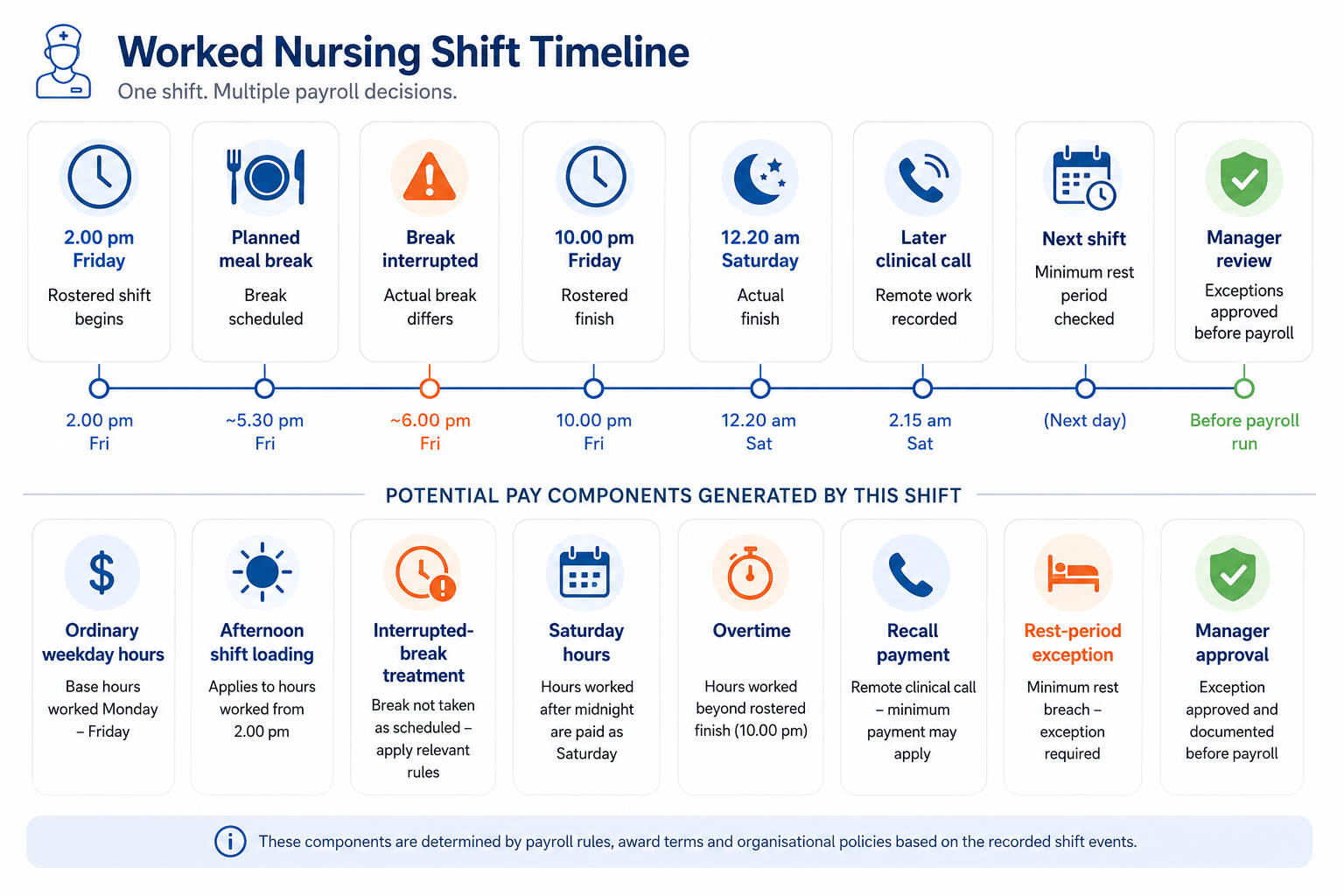
One nursing shift can create several payroll components. The purpose of the timeline is to show the sequence of events that payroll needs to assess, rather than apply one rate to the entire shift.
| Stage | Recorded information | Payroll impact |
|---|---|---|
| Employee setup | Part-time RN, correct level and pay point, relevant Award settings | Establishes the base rate and rule set |
| Roster | Friday 2.00 pm to 10.00 pm with planned meal break | Creates the expected shift and break |
| Actual attendance | Employee finishes at 12.20 am Saturday | Creates a roster variance and crosses into Saturday |
| Break record | Meal break is interrupted | Requires the break and overtime treatment to be reviewed |
| After-shift work | Clinical call completed after leaving | Remote recall minimum may apply |
| Next rostered shift | Start time falls inside the required rest period | Rest-between-shifts rule must be assessed |
| Approval | Manager confirms times, break and recall event | Payroll receives a reviewable record rather than a verbal explanation |
The value is not one automatic number appearing without context. It is a connected process in which the employee setup, roster, actual work and exceptions are available before payroll is authorised.
Nurses Award payroll implementation checklist
- Confirm the industrial instrument covering each employee.
- Map nurses to the correct classification, level, pay point or aged care increment.
- Separate general nursing and aged care rate structures.
- Confirm full-time, part-time and casual employment settings.
- Record part-time guaranteed hours and rostering arrangements.
- Review ordinary-hours, shiftwork and overtime configuration.
- Define how on-call and recall events will be entered.
- Confirm how actual breaks and missed-break exceptions will be approved.
- Identify allowances used by the organisation.
- Identify employees entitled to the additional shiftworker leave week.
- Test weekday, night, weekend, public holiday, overtime and recall scenarios.
- Review Award template updates before the first affected payroll.
Implementation is where a strong payroll system becomes useful. The aim is not to memorise every Award clause. It is to configure the recurring rules once, keep employee settings current and make unusual work visible for review.
Nurses Award payroll FAQs
Does the Nurses Award apply to every nurse in Australia?
No. Public-sector instruments, enterprise agreements and other Awards may apply. Nurses employed by primary and secondary schools are excluded from MA000034, and nursing assistants providing aged care or home care services are generally covered elsewhere.
What is the casual loading under the Nurses Award?
Casual employees receive a 25% loading on the minimum hourly rate for ordinary hours. Different percentage structures apply when casual employees work afternoon, night, weekend, public holiday or overtime hours.
What are the Saturday and Sunday rates?
For ordinary hours, full-time and part-time employees are generally paid 150% on Saturday and 175% on Sunday. Casual employees are generally paid 150% or 175% of the casual hourly rate.
How much annual leave do nurses receive?
Permanent employees covered by the Award generally receive five weeks of annual leave. Qualifying shiftworkers generally receive six weeks.
Does ClockOn include a Nurses Award template?
Yes. ClockOn provides a pre-built MA000034 template with base rule sets, nursing rate sets, allowance settings and leave configuration. Employers can review, update and customise the setup for their workforce.
Does payroll software decide the correct nursing classification?
No. The employer remains responsible for confirming Award coverage and classification. ClockOn then stores the selected Award, rule set, rate set and allowance set so those settings can be applied consistently through payroll.
Build a more reliable nursing payroll workflow with ClockOn
The Nurses Award is manageable when the payroll workflow captures the facts that drive the calculation.
ClockOn brings those facts together:
- A maintained Nurses Award template
- Employee-level Award, rule, rate and allowance settings
- Rostering across departments, roles and sites
- Actual start, finish and break records
- Configured overtime, penalty and leave rules
- Timesheet warnings, approvals and special rates
- Payroll, super and STP within the same system
This reduces the amount of Nurses Award logic employers need to rebuild manually and gives payroll teams a clearer way to review the shifts that do not fit the normal pattern.
For private healthcare providers, clinics, nursing agencies and other employers managing shift-based nursing teams, ClockOn provides the structure needed to move from rostered work to payroll-ready records without relying on disconnected spreadsheets and repeated data entry.
ClockOn does more than store Nurses Award rates. It connects the classification, roster, actual attendance, Award interpretation, approval and payroll records needed to turn complex nursing work patterns into reviewable pay outcomes.