
A connected payroll workflow moves one employee record through rostering, attendance, approval, payroll, payment, financial reporting and Single Touch Payroll. Each stage adds verified information without forcing payroll staff to recreate the same employee, shift, leave or earnings data.
Payroll integration improves more than payroll accuracy. It can reduce administrative work, strengthen internal controls, improve labour-cost visibility, support compliance reviews and give employees greater confidence in how their pay was calculated.
Workforce management becomes more useful when operational and financial records remain connected. Managers can compare planned labour with actual results, payroll can investigate exceptions faster, and finance can report labour costs using the same approved data.
What Is a Connected Payroll Workflow?
A connected payroll workflow is the controlled movement of employee data through the complete payroll lifecycle. It begins with employee setup and planned shifts, then continues through attendance, approvals, pay calculations, payment, accounting and government reporting.
Payroll integration does not require every decision to be automatic. Software can transfer information, apply established rules and identify exceptions, while employees, managers, payroll staff and authorised approvers remain responsible for reviewing and approving outcomes.
A connected payroll process should distinguish four different records:
- Planned hours from the roster
- Recorded hours from attendance
- Approved payable hours from the timesheet
- Paid hours and earnings from payroll
Payroll automation becomes risky when these records are treated as interchangeable. A published roster explains what was expected, while an approved timesheet reflects the payable result after attendance, leave and adjustments have been reviewed.
▶What Does the End-to-End Payroll Process Include?
A connected payroll workflow generally follows this sequence:
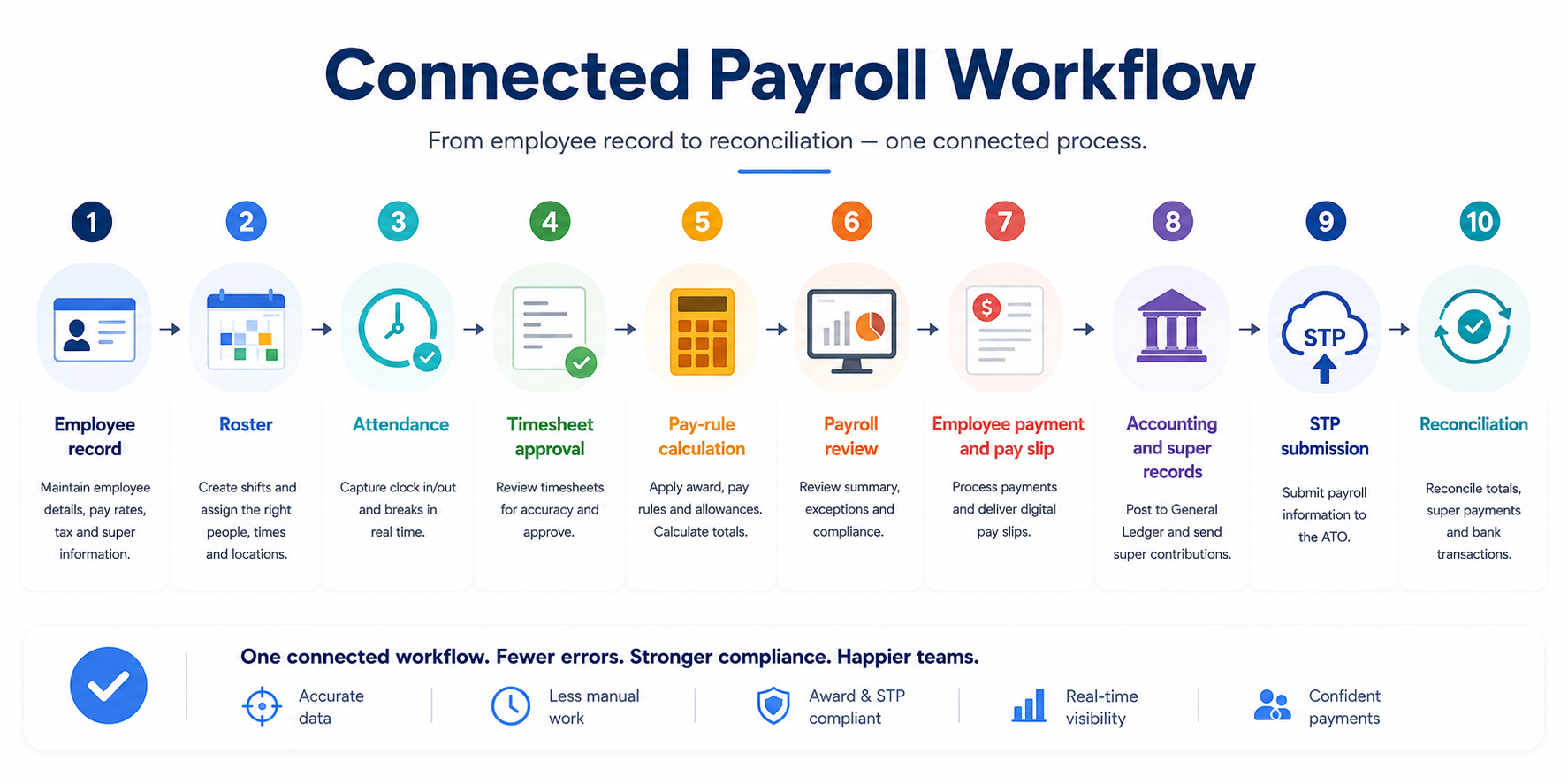
Each stage should preserve the source, status and approval history of important values. A payroll total should not exist as an unexplained figure disconnected from the employee record, approved time or pay rule that created it.
Important: Single Touch Payroll is an ATO reporting process. STP does not replace calculating wages, paying employees, issuing pay slips, processing superannuation or retaining payroll records.
▶What Information Moves Through Each Payroll Stage?
| Stage | Information entering | Information produced | Approval owner | Common risk |
|---|---|---|---|---|
| Employee setup | Employment and pay details | Payroll-ready employee profile | HR or payroll | Incorrect classification |
| Roster | Employee profile and availability | Planned hours and labour cost | Roster manager | Unbudgeted penalties |
| Attendance | Published shifts | Clockings and variances | Employee or manager | Missing clockings |
| Timesheet | Attendance, leave and changes | Approved payroll inputs | Line manager | Exceptions not reviewed |
| Pay rules | Approved time and employee conditions | Earnings categories | Payroll officer | Incorrect rule setup |
| Payroll | Earnings, tax, leave and super data | Final payroll register | Payroll approver | Unusual payments missed |
| Payment and reporting | Approved payroll | Payment, accounting and ATO records | Finance or authorised approver | Totals do not reconcile |
| Reconciliation | Payroll, payment and STP records | Completed control record | Payroll or finance | Rejections remain unresolved |
Why Do Disconnected Payroll Systems Create Hidden Costs?
Payroll integration problems often appear as minor administrative tasks. Exporting a file, correcting a spreadsheet or chasing one manager may not seem significant, but repeated manual handoffs compound across every employee and pay cycle.
Workforce management becomes inefficient when departments maintain separate versions of the same employee. HR may hold one employment type, rostering another classification, and payroll a different pay rate or cost centre.
Data flow also breaks when information moves through emails, spreadsheets, handwritten notes or reformatted CSV files. Each transfer creates another opportunity for information to be delayed, duplicated, changed or omitted.
▶How Does Duplicate Data Entry Increase Payroll Work?
Re-keying employee details, leave, hours and allowances consumes payroll time without adding a meaningful review control. It also creates the risk that one system will be updated while another retains outdated information.
Payroll integration should transfer approved data while retaining its source. Payroll staff can then review the result rather than rebuilding the transaction from another system.
▶How Do Disconnected Systems Waste Management Time?
Managers and payroll teams lose time when approvals occur outside the system. Payroll may need to chase missing timesheets, clarify handwritten adjustments, locate overtime approvals or confirm whether an email replaced an earlier instruction.
A connected workflow gives managers one place to review missing clockings, roster variances, leave, allowances and overtime. The approval remains attached to the employee record rather than disappearing into an inbox.
▶What Is the True Cost of Payroll Reconciliation?
Reconciliation becomes slower when roster, attendance, leave and payroll totals come from different databases. Payroll staff must first match the records before they can investigate the underlying difference.
A roster-to-actual variance report is more useful before payday than after an employee identifies a missing shift. Connected records also reduce investigation time after payroll because staff can trace a disputed amount through the approved timesheet, clocking, adjustment and roster.
| Disconnected task | Immediate effect | Wider operational cost |
|---|---|---|
| Re-entering employee details | Additional administration | Conflicting employee records |
| Reformatting CSV files | Slower payroll preparation | Formatting and version-control risk |
| Chasing approvals | Delayed pay-run completion | Manager and payroll disruption |
| Checking separate leave systems | Extra reconciliation | Incorrect balances or payments |
| Reading allowance emails | Inconsistent processing | Weak approval evidence |
| Rebuilding payroll reports | Delayed reporting | Poor labour-cost visibility |
| Investigating disputes manually | Longer response time | Reduced employee trust |
A WA local government payroll audit found around 15% of normal-cycle payroll departures needed to be discussed and resolved by payroll staff, and more than 390 leave applications were manually entered by payroll in 12 months because leave was not entered correctly elsewhere.
What Is a Payroll Single Source of Truth?
Payroll integration creates a single source of truth when one authoritative employee record supplies the information used by HR, rostering, attendance, leave and payroll.
Employment type, classification, ordinary hours, pay rate, location and manager should not change depending on which system is opened.
Employee changes should use effective dates. A new classification or pay rate should apply from the authorised date without rewriting historical payroll records.
The system should also retain version history so payroll can identify which conditions applied during a previous pay period, not only the employee’s current settings.
▶Which Employee Details Need One Authoritative Record?
- Employee identity
- Employment status
- Start and termination dates
- Employment type
- Classification
- Pay rate
- Award or enterprise agreement
- Contracted or guaranteed hours
- Primary location
- Department and cost centre
- Reporting manager
- Leave entitlements
- Tax information
- Superannuation information
- Skills, licences and qualifications
Ownership should also be assigned to each data field. HR may authorise an employment change, payroll may validate its pay impact, and the system should record both actions.
▶How Does One Employee Record Support the Employment Lifecycle?
Onboarding information should establish the employee record that later drives rostering, payroll, leave, reporting and offboarding.
When the employee changes roles, locations, hours or classifications, the approved change should reach every payroll-related process without requiring updates in several databases.
The same employment history should support termination processing, including final pay, leave balances, employment dates and STP information.
What Are the Seven Stages of a Roster-to-STP Payroll Workflow?
A connected payroll workflow can be assessed through seven practical stages. Each stage should produce a clear output that becomes the controlled input for the next stage.
▶1. Build a Payroll-Ready Roster
Workforce management starts with a roster based on correct employee information. The roster should consider employment type, availability, classification, contracted hours, qualifications and the pay rules likely to apply.
Planned start times, finish times, breaks, roles, locations and departments provide the first operational inputs into the pay cycle.
Connected rostering can show the estimated cost of a proposed shift before it is published. Managers can identify overtime, weekend penalties, public holiday work, minimum engagements and excessive labour costs while changes are still possible.
The forecast is not the final wage. The roster remains a plan until actual work, leave and exceptions have been reviewed.
Before publishing the roster, check:
- Employee availability and contracted hours
- Classification and employment type
- Minimum engagements and required breaks
- Potential overtime and penalty rates
- Required qualifications and licences
- Forecast labour cost against budget
ClockOn rostering software can connect employee availability, planned shifts and forecast labour costs with later payroll stages.
▶2. Capture Actual Attendance
Attendance records what occurred after the roster was published. Time may be collected through a physical clock, mobile app, web clock-on, kiosk, imported record or manager-entered timesheet.
Records may need to capture start and finish times, paid and unpaid breaks, location, department, job and cost centre.
Software can identify early starts, late finishes, missing clockings, missed breaks, call-outs and unplanned shifts. These events should become reviewable exceptions rather than being automatically accepted or ignored.
The system identifies the difference, while the manager confirms the workplace circumstances and appropriate outcome.
How rostered, recorded, approved and paid hours differ:
| Record type | Start | Finish | Break | Total | Status |
|---|---|---|---|---|---|
| Published roster | 9:00 am | 5:00 pm | 30 minutes | 7.5 hours | Planned |
| Clocked attendance | 8:52 am | 5:43 pm | 30 minutes | 8 hours 21 minutes | Recorded |
| Approved timesheet | 9:00 am | 5:30 pm | 30 minutes | 8.0 hours | Payable |
| Payroll result | Categorised by pay rule | 8.0 hours | Paid |
ClockOn time and attendance software can compare rostered work with actual clockings and highlight exceptions for review.
▶3. Review and Approve Timesheets
Timesheet approval is the main control between attendance and payroll calculation. Managers confirm which hours, leave events, allowances and adjustments should proceed.
Review should focus on missing clockings, overtime, shortened breaks, shift swaps, call-outs and work across several locations or cost centres.
Leave and attendance should remain connected. An employee should not appear as working a complete shift while also receiving paid leave for the same period.
When a manager corrects a record, the system should retain the original entry and identify what changed, who changed it, why and when it was approved.
Manager approval checklist:
- Resolve missing clockings.
- Review roster-to-actual variances.
- Confirm overtime reasons.
- Check missed or shortened breaks.
- Confirm approved leave.
- Review allowances and call-outs.
- Check location and cost-centre changes.
- Attach supporting notes.
- Complete final approval.
- Lock the approved period.
ClockOn timesheet payroll software can move approved employee time into payroll without re-keying the same hours.
▶4. Convert Approved Time Into Payroll Earnings
Payroll automation applies configured pay conditions to approved employee data. The calculation may depend on classification, employment type, day, time, work pattern, location and industrial instrument.
A connected workflow may calculate ordinary hours, overtime, penalties, casual loading, shift loadings, minimum engagements, higher duties and allowances.
Modern awards, enterprise agreements, employment contracts and payroll configuration each perform a different role. Software cannot compensate for an employee assigned the wrong classification, rate or employment type.
Payroll staff should be able to see the approved time, applied rule and resulting payroll category.
How time becomes a payroll category:
| Time or event | Rule applied | Payroll category | Required review |
|---|---|---|---|
| Weekday ordinary hours | Base classification rate | Ordinary earnings | Classification |
| Saturday hours | Weekend penalty | Penalty earnings | Applicable rule |
| Hours above threshold | Overtime condition | Overtime earnings | Threshold |
| Eligible duty | Allowance condition | Allowance | Eligibility |
| Approved paid leave | Leave rule | Leave earnings | Leave type |
| Public holiday work | Holiday condition | Public holiday earnings | Location and entitlement |
ClockOn award interpretation can apply properly configured pay conditions to approved employee data. Employers remain responsible for coverage, classifications, rates and configuration.
▶5. Review Payroll Before Finalising Pay
Draft payroll is the second major control point. Payroll staff compare approved inputs with the proposed financial result before employees are paid.
Exception reporting is generally more useful than manually recalculating every standard transaction. Payroll can focus on employees with no pay, material gross-pay changes, high overtime, negative leave balances, manual rate overrides or missing tax and super information.
Results should also be compared with previous pay periods. A large variance may be correct, but its cause should be identifiable before processing.
Pre-payroll checklist:
- All timesheets are approved.
- Leave is approved and coded.
- Payroll exceptions are resolved.
- Rates and classifications are current.
- Overtime and penalties are reviewed.
- Allowances have supporting evidence.
- PAYG and super calculations are reviewed.
- Starters and terminations are checked.
- Manual changes are documented.
- Final approval is recorded.
What a payroll exception report should show:
| Exception | Why it matters | Owner | Required action |
|---|---|---|---|
| Employee has no pay | Hours or setup may be missing | Payroll | Check employee status and attendance |
| Gross pay changed materially | Error or legitimate variance | Payroll manager | Review earnings categories |
| High overtime | Approval or rostering issue | Line manager | Confirm hours and reason |
| Negative leave balance | Leave may be miscoded | Manager and payroll | Check entitlement and approval |
| Manual rate override | Unauthorised rate risk | Payroll approver | Confirm authority and effective date |
| Unapproved time | Manager control was bypassed | Line manager | Approve or correct the entry |
ClockOn payroll management can centralise calculations, exceptions, reports and pay-run controls.
▶6. Pay Employees and Create Payroll Outputs
Approved payroll should lock the authorised calculation and create the records needed to pay employees, issue pay slips and update connected systems.
One final pay run may produce a bank file, employee pay slips, accounting journal, updated leave balances, cost-centre records, superannuation liabilities and an STP pay event.
These remain separate outputs. Creating an accounting journal does not pay employees, and submitting STP does not issue pay slips.
The final payroll register should remain traceable to each downstream record so finance and payroll do not produce different totals from the same pay cycle.
Fair Work requires pay slips to be issued within one working day of payday. Pay slips must contain prescribed information about pay, deductions and superannuation.
▶7. Report Payroll Through Single Touch Payroll
STP-enabled software sends payroll information to the ATO, including salary and wages, PAYG withholding, employment information, income classifications, allowances and superannuation-related amounts.
STP Phase 2 separates payments and employee information into more detailed reporting categories. Payroll should reconcile employee counts, gross amounts, withholding and classifications with the final payroll register before submission.
The ATO response should also be retained. Rejected or partially accepted employee information requires investigation rather than being treated as complete.
Important: An accepted STP response confirms that the report was processed. It does not prove that every classification, hour, rate or entitlement was correct.
What changed with Payday Super on 1 July 2026?
From 1 July 2026, employers report each employee’s year-to-date qualifying earnings and super liability through STP each payday. Super contributions generally need to reach the employee’s fund within seven business days after payday, although specified exceptions and alternative timeframes can apply.
Payroll categories must be mapped correctly so qualifying earnings and super liabilities reconcile with the final pay run.
Pre-STP checklist:
- Complete the payroll register.
- Confirm employee numbers.
- Reconcile gross pay and PAYG withholding.
- Check STP payment categories.
- Review qualifying earnings and super liabilities.
- Confirm payroll adjustments.
- Complete the authorised declaration.
- Check the ATO response.
- Resolve rejected records.
- Retain submission evidence.
How Does Connected Payroll Improve Workforce Planning?
Workforce management becomes more strategic when roster, attendance and payroll information can be compared in one reporting environment.
Managers can compare what was planned with what actually happened. This exposes overtime, absenteeism, unplanned labour and scheduling inefficiencies that a final payroll total cannot explain alone.
Connected data can also show whether expensive labour outcomes were caused by customer demand, staff availability, poor roster design or late operational changes.
Payroll should not only report historical wages. The information should help managers improve the next roster.
▶Which Labour Metrics Become More Useful?
- Rostered, recorded, approved and paid hours
- Rostered and actual labour cost
- Labour cost percentage
- Overtime by employee, manager or department
- Penalty-rate exposure
- Absence trends
- Agency or casual usage
- Department and location labour costs
- Cost per operating hour
These metrics are more reliable when they use the same employee, time and cost-centre data.
▶How Can Payroll Data Improve Labour Forecasting?
Historical payroll data can show which shifts regularly exceed rostered hours, trigger overtime or require additional casual labour.
Businesses may also compare scheduled labour with sales, production, bookings or patient demand when relevant operational data is available.
These patterns can help managers refine shift lengths, staffing levels, skill allocation and budget assumptions. Payroll becomes a source of operational intelligence rather than only a final administrative result.
Why Should Payroll Connect With HR and Finance?
Payroll should connect more than attendance and timesheets. Employee information originates in HR, labour activity occurs in workforce systems, and the financial result enters accounting and management reporting.
The workflow becomes weaker when any major part of that chain remains isolated.
▶How Does HR Data Affect Payroll?
Payroll relies on HR information such as employment type, classification, contracted hours, location, manager and commencement date.
Approved HR changes should reach payroll without requiring staff to interpret informal messages or manually update several databases.
Onboarding can also connect tax, superannuation, bank and employment information so missing details are identified before the first pay run.
Promotions, transfers, rate changes and changes to ordinary hours should use authorised effective dates.
▶How Does Leave Connect With Payroll?
Approved leave should flow into the same pay cycle used to calculate wages. The absence, payroll payment and balance reduction should refer to the same event.
Connected leave records reduce the risk of managers and payroll maintaining different balances. They should also distinguish paid leave, unpaid leave and partial-day leave because each may affect hours, earnings, balances and reporting differently.
ClockOn leave management can connect employee requests, approvals, payroll payments and updated balances.
▶How Does Payroll Connect With Finance?
Finance should receive final labour costs allocated to the correct accounts, departments, locations and cost centres.
Integration reduces the need to rebuild journals from payroll summaries or spreadsheets and improves cash-flow planning by showing expected wages, PAYG withholding, super liabilities and other payroll obligations.
Financial approval remains necessary. Payment files, journals and unusual liabilities should still be reviewed by authorised personnel.
How Does Payroll Connectivity Improve Compliance and Audit Readiness?
A connected payroll workflow creates a chain of evidence from planned work to the final reported result.
The system should preserve the roster, attendance record, timesheet adjustment, manager approval, pay-rule result, pay slip, payment record, accounting journal and STP response.
Connected records are easier to retrieve during employee enquiries, internal audits, Fair Work inspections, accountant reviews and payroll remediation exercises.
Records should also show who changed information and why. An overwritten timesheet without an explanation provides a weaker control than a logged correction.
Fair Work requires employers to keep time and wage records for seven years. Records must remain readily accessible, legible and in English.
▶What Does a Connected Payroll Audit Trail Show?
Roster → Clocking → Adjustment → Manager approval → Pay calculation → Payroll approval → Pay slip → Payment record → Accounting journal → STP response
Each step should be searchable using the same employee and pay-period identifiers. Historical configurations should also be retained so payroll can identify which classification, rate or rule applied when an earlier payment was calculated.
Audit-readiness checklist:
- Can the business reproduce the calculation?
- Is the original attendance record available?
- Are approved hours identifiable?
- Can payroll identify the applied rule?
- Are manual adjustments explained?
- Is the approving manager recorded?
- Is the payroll register available?
- Can the payment be verified?
- Is the pay slip retained?
- Is the STP response available?
- Can records be accessed for seven years?
ClockOn payroll compliance tools can support payroll records, reporting, reviews and traceability.
How Does Payroll Workflow Affect Employee Trust?
A connected payroll workflow gives employees greater confidence that their hours, leave, overtime and allowances have passed through a consistent approval process.
It also improves the response to employee questions. Payroll staff can explain how a payment was created instead of asking the employee to wait while several systems are checked.
When an error occurs, the source record and affected payroll category can be identified without reconstructing the complete pay cycle.
Employee access to approved timesheets, leave and pay slips can reduce uncertainty before it becomes a formal payroll dispute.
Automation should never be used to dismiss employee concerns. A calculated result still requires investigation when the source information or configuration may be wrong.
▶Which Payroll Problems Most Affect Employees?
- Missing shifts
- Incorrect overtime
- Delayed allowances
- Incorrect leave balances
- Unexplained deductions
- Repeated correction delays
- Inconsistent treatment between locations
- Pay slips that do not match payment
- Adjustments without supporting records
A national Fair Work Ombudsman hospitality campaign found a 67% non-compliance rate among audited takeaway food businesses. The majority of errors related to underpayment of hourly rates, incorrect pay slips, and incorrect/non-payment of weekend penalty rates.
Source: Fairwork.gov.au
Payroll integration builds trust when each correction is traceable and the employee receives a clear explanation.
Which Payroll Tasks Should Be Automated?
Automation is best suited to repeatable tasks governed by established rules and approved data.
Software can transfer employee details, compare shifts, calculate configured rules, generate exceptions, update leave and prepare payroll outputs.
Judgement-based decisions should remain with authorised people. Software can identify an unusual clocking, but a manager may need to decide whether it represents approved and payable work.
The system should retain evidence of each human decision rather than treating approval as an activity outside the workflow.
▶What Should Remain a Human Approval Step?
| Suitable for automation | Requires human judgement |
|---|---|
| Transfer employee details | Confirm award coverage |
| Compare roster and attendance | Decide whether unusual time is payable |
| Flag missing clockings | Approve corrected attendance |
| Apply configured pay rules | Confirm classifications |
| Generate payroll exceptions | Approve unusual allowances |
| Prepare payment files | Authorise employee payments |
| Generate pay slips | Approve the final pay run |
| Prepare STP information | Complete the STP declaration |
| Store audit history | Approve historical corrections |
Accountability remains with the employer. Software supports the process but does not assume responsibility for employee classifications, approvals or payroll outcomes.
Is an Integrated Platform Better Than Separate Payroll Systems?
Payroll integration can be achieved through one workforce management platform or several specialist systems connected by reliable integrations.
A workflow does not become compliant simply because it uses one platform. Employee setup, configuration, approvals and payroll review still matter.
Specialist applications can work effectively when data fields, employee identifiers and approval statuses remain aligned.
Integration becomes less useful when it transfers only totals. Payroll should retain enough detail to explain how each earning was produced.
▶How Do Payroll Technology Approaches Compare?
| Approach | Main advantage | Main risk | Best suited to |
|---|---|---|---|
| Integrated workforce platform | One data flow and audit history | Incorrect setup affects several stages | Shift-based employers |
| Connected specialist systems | Flexible specialist functions | Integration and mapping gaps | Established technology stacks |
| CSV transfer | Low initial integration requirement | Formatting and version errors | Limited controlled transfers |
| Manual entry | Flexible for unusual cases | Re-keying and knowledge dependency | Very small or exceptional processes |
Employee numbers, award complexity, locations, payroll frequency, allowance volume and approval structures should guide the choice.
How Can You Assess Your Current Payroll Workflow?
A connected payroll assessment should test data movement, approvals, reporting and traceability.
- Is employee information entered into several systems?
- Do employee details remain consistent across HR, rostering and payroll?
- Can managers compare rostered and actual hours?
- Do approved timesheets transfer directly into payroll?
- Does approved leave flow into payroll?
- Are configured rules applied to approved time?
- Can payroll identify exceptions before processing?
- Can every pay slip amount be traced to its source?
- Are accounting journals generated from final payroll?
- Can labour costs be reported by location or department?
- Are STP totals reconciled with payroll?
- Are changes and approvals logged?
- Can employee pay questions be investigated quickly?
- Can historical records be retrieved for an audit?
- Is payroll knowledge shared rather than held by one person?
0 to 5 yes answers: Mostly disconnected
6 to 10 yes answers: Partially connected
11 to 15 yes answers: Substantially connected
This score is an operational diagnostic. It is not a legal compliance assessment.
▶What Shows That Payroll Is Only Partially Connected?
- CSV files require regular editing.
- Managers approve hours by email.
- Payroll relies on separate spreadsheets.
- Leave balances differ between systems.
- Allowances arrive as informal messages.
- Payroll staff calculate penalties manually.
- Labour reports require spreadsheet rebuilding.
- STP errors appear after submission.
- Original records are overwritten.
- One employee holds all payroll knowledge.
- Pay slip amounts cannot be traced easily.
How Does ClockOn Connect the Payroll Lifecycle?
ClockOn can link employee records, rostering, attendance, timesheet approvals, leave, award interpretation, payroll and STP reporting within one controlled workflow.
Employee information and planned shifts establish the operational starting point. Attendance records what occurred, managers approve payable time, and properly configured pay conditions translate approved data into payroll earnings.
Payroll staff can review exceptions before finalising the pay run. The resulting data can then support pay slips, payroll reporting, accounting outputs and STP submission without rebuilding the same employee hours in several disconnected tools.
The ATO software product register lists ClockOn Payroll and ClockOn Online as payroll products supporting STP payroll events.
ClockOn can reduce manual handoffs between:
- Employee records
- Rostering
- Time and attendance
- Timesheet approval
- Leave management
- Award interpretation
- Payroll calculations
- Pay slips
- Payroll reporting
- STP submission
A connected ClockOn workflow does not remove employer responsibility. Businesses remain responsible for employee classifications, industrial instrument coverage, configurations, approvals and payroll outcomes.
ClockOn payroll software connects approved workforce information with payroll calculations and STP reporting.
ClockOn can also support employers managing enterprise agreements with conditions that differ from standard award configurations.
Businesses that want connected software without processing every pay run internally can use ClockOn outsourced payroll services.
See how ClockOn can connect rostering, attendance, approvals, payroll and STP reporting within one controlled workforce management process.
What Questions Do Employers Ask About Connected Payroll?
What Is a Payroll Workflow?
A payroll workflow is the complete process used to collect, approve, calculate, pay and report employee payroll information.
What Is Payroll Integration?
Payroll integration connects employee, roster, attendance, leave, payroll and finance records so approved information can move between systems without repeated manual entry.
What Is Payroll Process Automation?
Payroll automation uses software to transfer data, apply configured rules, calculate standard payments, identify exceptions and produce payroll outputs.
How Does a Roster Connect to Payroll?
Roster-to-payroll integration compares planned shifts with actual attendance before approved payable hours move into payroll for calculation.
Can Payroll Be Processed Directly From a Roster?
Rostered hours should not normally be treated as proof of hours worked. Attendance, leave, overtime, break changes and unplanned shifts may alter payable time.
What Is a Payroll Single Source of Truth?
It is one authoritative employee record that supplies consistent information to HR, rostering, leave, payroll and reporting.
How Does Connected Payroll Improve Reporting?
Connected reporting can compare rostered hours, actual hours, overtime, labour costs, departments and locations using consistent employee and payroll data.
Does an Accepted STP Submission Prove Employees Were Paid Correctly?
No. Acceptance confirms that the ATO processed the submitted report. It does not confirm that classifications, hours, rates or employee entitlements were correct.
What Changed With Payday Super?
From 1 July 2026, employers report each employee’s year-to-date qualifying earnings and super liability through STP each payday. Super contributions generally need to reach the employee’s fund within seven business days after payday, subject to applicable exceptions.
How Long Must Payroll Records Be Kept?
Employers generally need to retain time and wage records for seven years. Records must remain accessible, legible and in English.
Does STP Replace Pay Slips?
No. Employees must still receive a compliant pay slip within one working day of payday.
What Happens When STP Information Is Incorrect?
Incorrect information may be corrected through a later pay event or an update event, depending on the issue, payroll software and current ATO requirements.