
.png "down arrow")
‣ Why Upgrade to ClockOn Online
ClockOn Online is the web-based version of ClockOn, designed to make payroll, rostering and workforce management easier to run without the overhead of maintaining a local system.
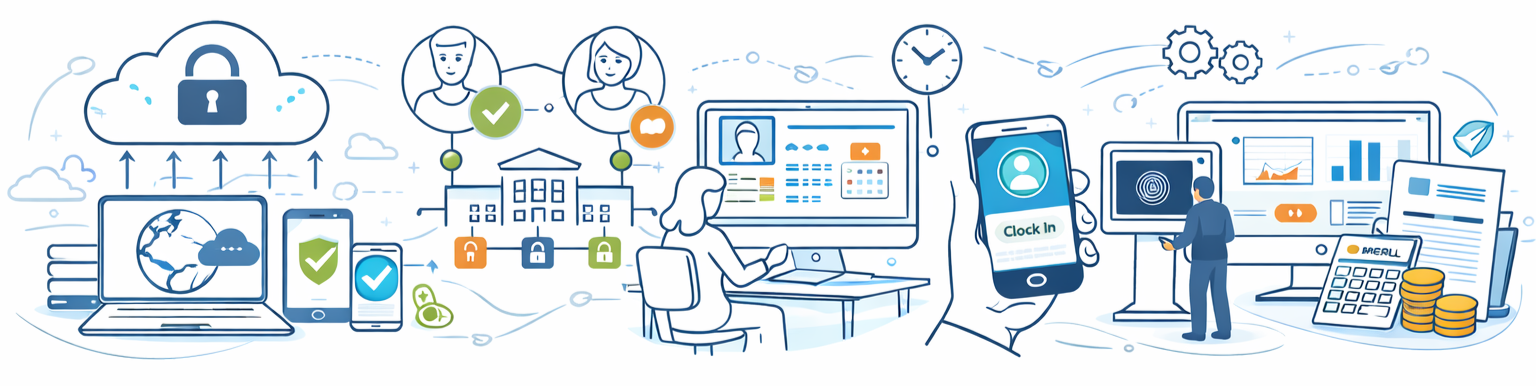
Instead of installing software, managing backups or applying updates, ClockOn Online runs securely in the cloud and is always kept up to date with the latest compliance changes and platform improvements. .png?width=800&height=150&name=Desktop%20to%20Online%20(3).png) For many businesses, moving to Online simplifies day-to-day administration while giving managers and employees better access to the tools they need.
For many businesses, moving to Online simplifies day-to-day administration while giving managers and employees better access to the tools they need.
- Access anywhere – Run payroll and manage staff from any device with internet access
- No backups or updates – The system is maintained and updated automatically
- Compliance ready – Stay ahead of regulatory changes such as Payday Super
- Employee self-service – Staff can access payslips, leave requests and rosters online
- Mobile time capture – Clock in via mobile app or tablet kiosk instead of physical scanners
- Integrated workforce management – Payroll, HR, rostering and attendance in one connected system
While ClockOn Online delivers many advantages, some workflows operate differently compared to ClockOn Desktop. The sections below explain what changes to expect so you can determine whether Online is the right fit for your business.
‣ Who ClockOn Online Is Best For
ClockOn Online is designed for businesses that want a simpler, cloud-based way to manage payroll and workforce administration without maintaining a local system.
Many existing ClockOn Desktop customers move to Online to reduce maintenance, access their system from anywhere and streamline payroll and staff management into one connected platform.
ClockOn Online is typically a strong fit for businesses that:
- Want cloud access – Run payroll and manage staff from any location
- Prefer automatic updates – No software installs, upgrades or backups to manage
- Run regular payroll – Process weekly, fortnightly or monthly payroll through an online system
- Want employee self-service – Staff access payslips, leave requests and rosters through the portal
- Use mobile or kiosk time capture – Staff clock in via tablet kiosk or the ClockOn GO mobile app
- Want a connected system – Payroll, rostering, HR and attendance working together
Some Desktop environments rely on workflows that operate differently in ClockOn Online. The next section explains the key differences so you can understand how Online works before deciding to migrate.
‣ Key Differences Between Desktop & Online
ClockOn Online is built on a modern cloud platform, which means some workflows operate differently compared to ClockOn Desktop.
While Desktop systems are installed locally and often evolve around specific office setups, ClockOn Online is designed to provide consistent access, stronger compliance controls and better integration across payroll, rostering and workforce management.
For most businesses, these changes simplify administration and improve visibility across their workforce. However, some processes may work differently than they do in Desktop.
- Cloud-based access – The system runs securely online rather than from a locally installed application
- Structured permissions – Access to features and information is controlled through user roles and departments ⓘ Online uses role-based permissions to improve security and reporting accuracy across departments and locations.
- Employee portal access – Staff interact with the system through a secure employee portal ⓘ Employee self-service access must be enabled by an administrator after migration. Employees then activate their portal account.
- Modern time capture methods – Mobile app and tablet kiosk clock-ins replace many hardware-based solutions ⓘ Biometric fingerprint scanners used with some Desktop installations are not currently integrated with ClockOn Online. Staff typically clock in using the ClockOn GO mobile app or a shared tablet kiosk.
- Updated reporting and payroll workflows – Some reports and correction processes differ from Desktop ⓘ Certain legacy Desktop reports may appear differently in Online, and payroll corrections follow structured adjustment or rollback workflows.
‣ Important Workflow Changes to Be Aware Of
Most businesses find that ClockOn Online simplifies day-to-day administration. However, some processes operate differently compared to ClockOn Desktop due to the cloud-based architecture of the platform.
Understanding these differences before migrating helps ensure a smooth transition.
- Time clocks and scanners – Many Desktop installations use physical scanners connected to a local PC. ⓘ Hardware fingerprint scanners used with some Desktop setups are not currently integrated with ClockOn Online. Most businesses move to the ClockOn GO mobile app or a shared tablet kiosk for staff clock-ins.
- Employee portal activation – Employees access payslips, leave requests and roster information through the secure employee portal. ⓘ Employee self-service must be enabled by an administrator after migration. Staff then activate their account using an invitation link.
- Roster visibility – Online uses structured access permissions to control what employees and managers can view. ⓘ Departments and roles determine which rosters employees can see. This prevents staff from viewing rosters outside their assigned areas.
- Payroll corrections – Adjustments follow a structured workflow designed to maintain payroll integrity and compliance. ⓘ Corrections are typically applied through payroll adjustments or rollback processes rather than directly editing historical payroll records.
- Reporting differences – Some legacy Desktop reports may appear differently or be structured differently in Online. ⓘ ClockOn Online uses a newer reporting framework designed to support cloud performance and future feature expansion.
These changes are designed to support secure cloud access, improved compliance and more scalable workforce management. The next section explains how the migration process works if you decide to move from Desktop to ClockOn Online.
‣ How the Migration Process Works
Migrating from ClockOn Desktop to ClockOn Online is a structured process designed to move your existing payroll and employee data into the cloud while ensuring your system is configured correctly.
The exact migration process can vary depending on how your Desktop system is currently used, but most upgrades follow these general steps.
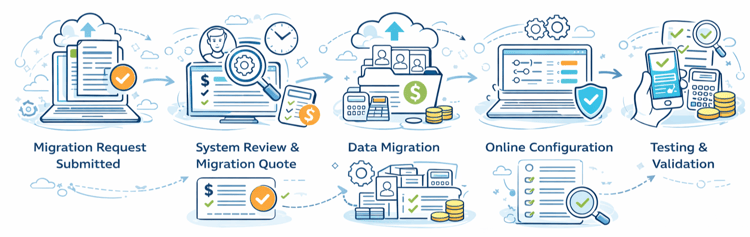
- Migration request submitted – Complete the migration request form so our team can review your current Desktop setup.
- System review and migration quote – We review your Desktop configuration to identify any setup differences when moving to Online and provide a quote if migration assistance is required. ⓘ Migration assistance costs depend on the complexity of your Desktop environment. Smaller payroll-only systems may require minimal setup, while more complex configurations may involve additional implementation support.
- Data migration – Your employee records, payroll configuration and historical payroll data are transferred into your new ClockOn Online environment.
- Online configuration – Key settings such as employee portal access, departments, permissions and payroll settings are configured.
- Testing and validation – Before running payroll in Online, it’s recommended to review your setup and confirm reports and payroll calculations align with your expectations.
Depending on the complexity of your Desktop environment, some businesses choose to manage the transition themselves, while others prefer a guided or fully managed migration service.
‣ Migration Options & Setup Support
Every ClockOn Desktop environment is a little different. Some businesses use Desktop mainly for payroll and STP submissions, while others have more complex setups involving rostering, scanners or customised workflows.
Because of this, there are 2 ways to migrate to ClockOn Online depending on how much assistance you require.
- Self-managed migration – Suitable for smaller businesses with a straightforward Desktop setup who are comfortable configuring their Online environment after the data migration.
- Done-for-you migration – For businesses with more complex environments, our team can manage the configuration, validation and transition to Online on your behalf. ⓘ Some migrations may involve setup or implementation costs depending on the complexity of the Desktop environment and the level of assistance required.
Once you submit the migration request form, our team will review your Desktop configuration and advise which migration option is most suitable for your business.