






 How ClockOn Works
 Feature list
 Templates
 For Accountants
 Payday Super
 About Us
 Blog
Blog Integrations
 Press Releases
 Help Centre
 Professional Services
 Setup Service
 Training
With ClockOn, manage staff schedules, track attendance, process payroll, and keep HR documents organised and compliant - all within one powerful, connected system.
Employee Self Service Portal
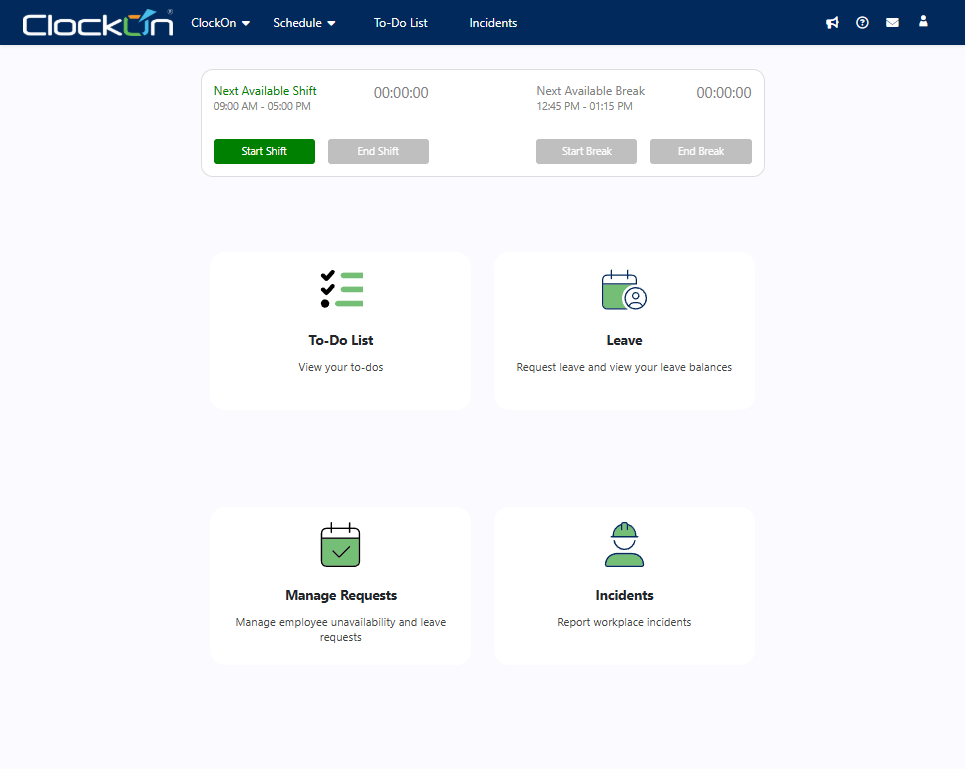
Staff can access a secure online employee portal via their web browser to check rosters, clock in, submit leave requests & manage workforce tasks.
-
Everything Employees Need in One Portal
View rosters, clock in & out from any supported web browser. -
Connected to Your Workforce Management System
Keep attendance, approvals and payroll records aligned. -
Reduce Manual Admin
Replace manual updates with a central employee portal
Trusted by businesses great and small




Employee Self Service
Employees don't need separate apps or paperwork to manage their workday. ClockOn provides one secure online web portal where staff can access schedules, record attendance, submit requests and stay connected with the workforce management system.
-
Access rosters, shifts and break information
-
Record attendance with online clocking
-
Request leave and view leave balances
-
Submit availability, timesheets and workplace requests
.png?width=1448&height=1086&name=clockon%20web%20portal%20features%20(3).png "clockon web portal features (3)")
Payroll-Ready Time Data
Payroll should not start with chasing hours, fixing timesheets or re-entering employee updates. ClockOn’s Employee Web Portal helps staff record shifts, breaks, leave and timesheets in one connected system, giving payroll cleaner information before the pay run begins.
-
Employee data flows directly into payroll without re-keying
-
Connect approved leave and availability to payroll records
-
Reduce manual adjustments from missing shift data
-
Give payroll teams clearer records before processing wages
%20(1).png?width=1000&height=1250&name=All%20in%20one%20HR%20and%20payroll%20(1000%20x%201250%20px)%20(1).png "All in one HR and payroll (1000 x 1250 px) (1)")
Built for Australian Compliance
Businesses can manage payroll compliance more reliably when timesheets feed directly into payroll calculations. ClockOn maintains hours worked and payments processed. This helps reduce payroll errors and supports Payday Super requirements & Single Touch Payroll (STP) reporting.
-
Automated tax calculations
-
Payday Super compliance
-
Award interpretation rules
-
STP payroll reporting
"The support from ClockOn during the implementation and change-over period was exceptional; the training provided was concise and the system itself very user friendly"
⭐⭐⭐⭐⭐
Upgrade to add HR tools
Everything You Get with ClockOn Pro:
-
Employment Records
Unlock Pro HR Features Without the Price Tag Bloat
Quick Setup, Easy to Use
Start fast with built-in templates and local support.
HR Essentials for Growing Teams
Onboarding, leave, and records — all in one place.
All-in-One System,
No Fuss
Ditch spreadsheets and disconnected tools - streamline everything
Frequently Asked Questions
Got questions? We’ve got answers!
Can employees access the portal without installing an app?
Yes. The ClockOn Employee Web Portal runs in a web browser, so employees can securely log in from a computer, tablet or mobile device without installing additional software.
What can employees do in the Employee Web Portal?
Employees can view published rosters, clock in and out, record breaks, submit timesheets, request leave, update availability, view leave balances, complete assigned tasks and report workplace incidents, depending on the permissions configured by your business.
Can employees view their roster online?
Yes. Employees can access published rosters through the portal, including shift dates, start and finish times, breaks, locations and other scheduling information.
Can employees clock in and out through the web portal?
Yes. Employees can start and finish shifts and record meal breaks using the online clocking feature when it has been enabled by their employer.
See For Yourself
-2.png?width=1242&height=463&name=Mask%20group%20(16)-2.png)