
Most payroll software demos start at the wrong end of the process.
You see the pay run screen. You see a payslip. Someone shows you how quickly you can click "process payroll".
But if your employees work under complex Modern Awards, that's rarely the hard part.
The difficult work happened earlier, when a Tuesday shift, Saturday shift, late finish, missed break or overtime threshold had to be turned into the right combination of ordinary hours, penalties, overtime and allowances.
That changes what "best payroll software" actually means.
What is the best payroll software for complex Modern Awards?
For an Australian business with complex Modern Awards, the best payroll software is usually one that connects actual hours worked with configurable award interpretation and payroll. It should be able to take the circumstances of a shift and turn them into the appropriate ordinary hours, overtime, penalties and allowances, rather than leaving payroll staff to interpret each timesheet manually.
ClockOn is particularly suited to shift-based Australian businesses where rostering, attendance, award rules and payroll need to work together. A simpler payroll product may still be the better choice where employees work predictable hours with relatively few variable pay conditions.
A useful buying rule: If an employee's pay changes depending on when, where or how they work, look at the award interpretation workflow before you look at the payroll screen.
▶Which type of payroll system do you need?
| Workforce or payroll situation | Complexity | Capability to prioritise | Software approach |
|---|---|---|---|
| Mostly salaried employees on fixed hours | Lower | Core payroll, reporting and integrations | Standard payroll software may be enough |
| Shift workers with weekend or evening penalties | Medium | Actual time capture + penalty rules | Payroll with time and attendance and award interpretation |
| Multiple classifications or employment types | Higher | Configurable rules tied to employee context | Award-aware workforce and payroll platform |
| Multiple Awards or business-specific conditions | Higher | Multiple rule sets, classifications and customisation | Configurable award interpretation platform |
| Enterprise agreement or custom pay rules | Higher | Custom rule configuration and testing | Flexible payroll rules rather than template-only software |
| Employer does not want to run payroll internally | Depends | Payroll expertise and managed processing | Outsourced payroll service |
The point is not that every business needs sophisticated award interpretation. Plenty don't.
The question is whether your payroll result depends on information that exists before payroll begins.
For a shift-based workforce, a more useful picture of payroll looks like this:
Roster → clock-in/out → approved timesheet → employee and classification context → award rules → penalties, overtime and allowances → payroll → STP and reporting
That is where much of the difference between basic payroll and award-aware payroll sits.
Why do Modern Awards make payroll software harder to choose?
Modern Award payroll is not simply hours × hourly rate. Awards can set conditions around pay, hours of work, rosters, breaks, allowances, penalty rates and overtime, so the value of an hour can depend on the circumstances in which it was worked.
That sounds obvious when written down. In practice, it creates a lot of small decisions.
Was the work ordinary time or overtime?
Did the Saturday condition apply?
Was there a shift loading?
Did the employee work long enough to trigger an allowance?
Was the employee working under the right classification?
Did a break change the calculation?
A payroll system only sees the final numbers you give it. An award-aware system can use more of the information that produced those numbers in the first place.
▶The same employee can generate several different pay outcomes
Take a part-time employee who works:
- Tuesday from 9:00 am to 5:00 pm
- Saturday from 12:00 pm to 8:00 pm
- one late shift
- one shift that crosses an overtime threshold
- one shift where an allowance condition applies
It is still one employee with one underlying employment relationship, but those shifts may not all produce the same payroll treatment.
The exact result depends on the Award, agreement, classification and applicable conditions, which is why generic percentages are misleading here. Fair Work notes that penalty rates depend on the Award that applies, while overtime is generally work outside the ordinary hours set by the relevant Award or agreement.
This is the test I would use in a payroll demo:
Don't ask, "Does your software support penalty rates?"
Put that employee's week on the screen and ask, "Show me what happens."
The second question is much harder to answer with a feature checklist.
▶Award coverage and classification still need to be correct
Payroll automation starts after you have worked out which rules should apply.
Fair Work describes classifications as award-based descriptions of roles and work, often taking duties, supervision, experience and qualifications into account. Employers should also review classifications when an employee's duties, responsibility, training or qualifications change.
That leads to an important distinction:
Important: Software can automate a configured rule consistently. It cannot make a wrong Award or classification become right.
ClockOn makes the same point in its own Award Templates support documentation. Its templates are described as a starting point, with businesses expected to review the conditions, allowances, rates and rules that apply to their employees.
That is a better standard to expect from payroll software vendors than a blanket promise that software will "make you compliant".
8 things payroll software needs to handle complex Awards properly
The strongest complex-payroll systems don't just add more pay categories. They connect the information that determines pay with the rules used to calculate it.
Here is what I would test.
▶1. Genuine award interpretation, not just stored pay rates
Award interpretation software should be able to apply configured rules to workforce data and determine how worked time should be treated for payroll.
That is different from simply storing "$X per hour" against an employee.
Depending on your workforce, test whether the system can deal with:
- ordinary hours
- overtime thresholds
- Saturday and Sunday penalties
- public holiday conditions
- shift penalties or loadings
- minimum engagements
- allowances
- casual, part-time and full-time conditions
- different classifications
- business-specific rules
ClockOn's Award Manager groups rule sets, rate sets and allowance sets within an Award configuration. ClockOn's award interpretation software then sits within the broader rostering, attendance and payroll workflow.
The distinction matters because "supports Awards" can mean very different things from one product to another.
A vendor might mean it gives you pay categories named "Saturday" and "Overtime".
What you want to know is how those categories get triggered.
See how ClockOn applies Award templates
ClockOn's support documentation includes an interactive walkthrough showing how its Award templates can be added to an organisation. Its documentation also makes clear that the settings should be checked against the business's actual payroll requirements.
▶2. Time and attendance connected directly to payroll
If an entitlement depends on when somebody worked, payroll needs reliable time information.
That means start times, finish times and breaks aren't just attendance records. They can be payroll inputs.
ClockOn's Creating & Editing Time Sheets guide explains that rostered and worked times can be converted at payroll into records such as normal, penalty and overtime hours. Its time and attendance software can capture worked time through mobile, kiosk and other attendance methods.
For a complex workforce, I would look for:
- clock-in and clock-out records
- actual start and finish times
- break records
- rostered versus worked hours
- exceptions and warnings
- manager review or approval
- a clear route from an approved timesheet into payroll
There is a compliance reason for caring about the underlying records too. Fair Work's record-keeping guidance requires certain pay records to separately identify items such as loadings, penalty rates and monetary allowances, and there are additional record requirements around hours and overtime in relevant circumstances.

▶3. Penalty rate and overtime automation
Complex payroll software should be able to use configured rules to recognise when worked time crosses into overtime or another pay condition.
But again, don't test that with a yes/no question.
Test:
- a Saturday shift
- a Sunday shift
- a public holiday
- work before or after a particular time
- overtime after a daily threshold
- overtime after a weekly threshold
- a shift crossing two different time bands
- the interaction between different conditions
ClockOn's overtime configuration documentation shows rules that can trigger overtime from worked thresholds, days and time periods.
That is the level at which a software evaluation becomes useful.
A tick beside "overtime" on a pricing page tells you very little.
Seeing your own overtime scenario calculated tells you much more.
▶4. Allowance automation
Some allowances can be linked to conditions the system knows about. Others depend on information payroll still needs someone to enter.
The important question is not simply whether a system "supports allowances". It is which allowances can be triggered from workforce data and which still require manual intervention.
Depending on the Award or agreement, examples might include:
- meal allowances
- uniform or laundry allowances
- travel or vehicle allowances
- first aid allowances
- tool allowances
- other industry-specific payments
Fair Work states that the penalty rates or allowances an employee is entitled to depend on the Award, agreement or other industrial instrument that applies.
ClockOn's allowances and deductions guide shows both allowance templates and employee-specific allowances. Its Award Templates documentation also gives real examples of allowances that are system-calculated and others that require manual entry.
That distinction is worth asking every vendor about.
▶5. Multiple Awards, classifications and roles
One employer can have employees covered by different Awards.
Fair Work gives the example of a construction business where tradespeople are covered by the Building and Construction Award while office staff may be covered by the Clerks Award. Which Award applies depends on the business, the coverage clauses and the work the employee performs.
Your software may therefore need to handle:
- different Awards
- different classifications
- casual, part-time and full-time employees
- different roles
- departments or locations
- employees moving classifications
- higher duties or role-specific rates where applicable
- different rule sets for different groups
This is another place where the data model matters.
An employee record shouldn't just tell payroll who the person is. For complex payroll, it may also need to tell the calculation engine what employment context applies to that person's work.
ClockOn's Award Manager allows rule sets, rate sets and allowances to be grouped and assigned to employees.
See how Awards are assigned to employees in ClockOn
▶6. Custom rules and enterprise agreements
A large library of Award templates is not the same thing as being able to handle your payroll.
Some employers operate with:
- enterprise agreements
- above-award rates
- company-specific conditions
- custom allowances
- negotiated arrangements
- unusual overtime rules
- other established pay practices that need to be reflected correctly
If that describes your business, configurability matters more than the size of a vendor's template library.
ClockOn can configure rule, rate and allowance structures, and its guide to automating enterprise bargaining agreements explains how custom conditions can be incorporated into the payroll setup.
The practical test is straightforward:
Give the vendor the actual agreement. Then give them a difficult employee scenario from that agreement and ask them to show how it would be configured.
A generic "yes, we support EBAs" isn't enough.
▶7. Payroll records and audit visibility
Good payroll software should make it possible to answer a surprisingly basic question:
Why was this employee paid this amount?
That becomes much easier when you can trace the calculation back through:
- worked times
- breaks
- classification
- rate
- penalties
- overtime
- allowances
- approvals
- adjustments
- payroll records
Fair Work requires prescribed employment records to be kept, including rates of pay and separately identifiable payments such as certain loadings, penalty rates and monetary allowances.
For businesses with separate managers checking timesheets before payroll, workflow controls can help as well. ClockOn's Time Sheet Lockdown feature lets authorised timesheet officers review and sign off timesheets before the payroll process begins.
See ClockOn's timesheet sign-off workflow
That sort of hand-off is more interesting to me than whether a payroll screen looks modern.
It reduces the grey area around who has checked the underlying hours before money moves.
▶8. Australian payroll and reporting requirements
Award interpretation is only one part of Australian payroll.
The system still needs to deal with the rest of the pay run, including areas such as:
- PAYG withholding
- STP reporting
- superannuation workflows
- leave accruals
- payroll reporting
- payroll records
- updates when requirements change
ClockOn supports payroll and STP reporting, with its Processing STP guide documenting the reporting workflow through to the ATO.
The bigger point is that payroll rules don't stay still.
For example, the 2026 Annual Wage Review increased minimum award wages by 4.75% from the first full pay period starting on or after 1 July 2026.
So "we configured payroll three years ago" is not a maintenance strategy.
You need to understand how your vendor handles rate and rule changes, what gets updated automatically, what needs review and who remains responsible for checking the setup.
▶What should complex Award payroll software be able to handle?
| Payroll condition | Example | Information the system may need | What to test in a demo |
|---|---|---|---|
| Overtime | Employee crosses a daily or weekly threshold | Worked hours, Award rules, employment context | Does overtime trigger at the correct point? |
| Weekend penalties | Saturday or Sunday work | Day and worked times | Does the correct condition apply automatically? |
| Public holidays | Shift worked on a public holiday | Date, location, applicable rule | How does the system identify and calculate it? |
| Shift penalties | Late or overnight work | Start and finish times | What happens when a shift crosses rate periods? |
| Allowances | Meal or laundry allowance | Trigger condition and employee settings | Automatic, manual or configurable? |
| Minimum engagement | Short casual shift | Employment type and shift duration | Can minimum payable time be handled? |
| Higher duties | Employee performs another classified role | Role or classification context | How is the different condition recorded and applied? |
| Multiple classifications | Employee works in different capacities | Employee and shift context | Can payroll distinguish the circumstances correctly? |
Payroll software vs award interpretation software: what's the difference?
Standard payroll software is mainly concerned with processing payroll from the earnings information supplied to it. Award-aware payroll or workforce software can go further by using employee and worked-time information to help determine what those earnings should be.
The boundaries vary between products, so don't treat these categories as absolute.
| Capability | Standard payroll software | Award-aware payroll/workforce platform |
|---|---|---|
| Store an hourly rate | Yes | Yes |
| Process a pay run | Yes | Yes |
| STP reporting | Usually | Usually |
| Capture worked shift context | Varies | Typically a core part of the workflow |
| Interpret time-based penalties | Varies | Configurable |
| Calculate overtime from timesheets | Varies | Configurable |
| Trigger allowances from conditions | Varies | Configurable |
| Connect roster → actual time → payroll | Varies | Often a core capability |
| Handle complex custom rules | Varies | Designed for this use case |
This is why I wouldn't compare complex payroll systems purely by counting payroll features.
If one system gives you 80 payroll features but still requires somebody to manually translate each difficult timesheet before payroll, that manual interpretation remains part of your payroll process.
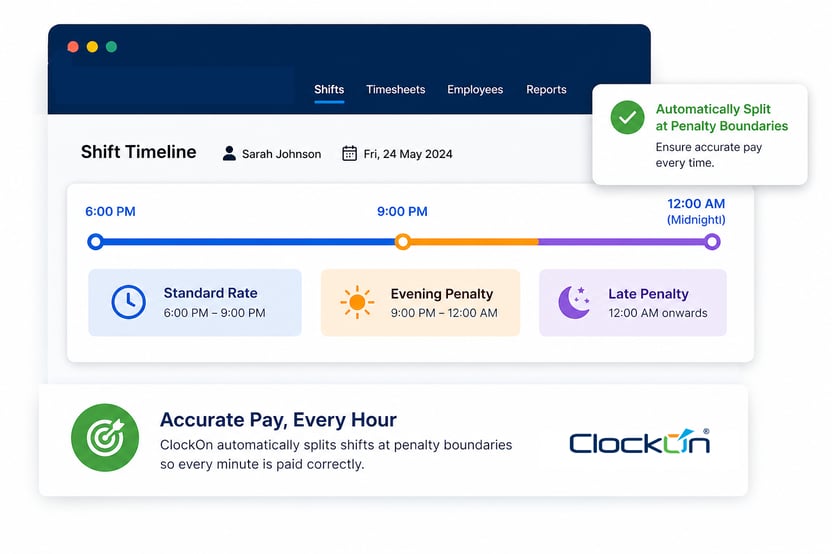
ClockOn's timesheet payroll software is built around this connection. Approved timesheets feed into payroll calculations, where configured overtime, penalties and allowances can be applied before payroll is finalised.
How should you test payroll software before buying it?
Don't evaluate complex payroll software with a clean demo employee working 9:00 am to 5:00 pm, Monday to Friday.
Use your worst timesheets.
A vendor that can demonstrate your awkward real-world cases is giving you more useful evidence than one that can show you a polished standard pay run.
▶Build a payroll stress test
Choose three to five historical payroll scenarios that created work for your payroll team.
Good candidates include:
- Saturday or Sunday work
- public holiday work
- overtime
- an allowance
- a late or overnight shift
- an unusual or missed break
- an employee working under another classification
- an above-award employee
- a classification change
- a multi-location employee, where location changes the relevant payroll context
- one scenario your payroll person currently checks manually every pay cycle
Strip out identifying employee information if needed, then give the same scenarios to each shortlisted vendor.
Ask them to show the workflow from raw time data to the final payroll result.
That's your comparison.
▶What should you ask during a payroll software demo?
| Question to ask | Why it matters | What the vendor should demonstrate |
|---|---|---|
| How does the system know a penalty applies? | Tests whether the condition is actually interpreted | Rule being triggered from relevant employee or shift data |
| What happens when this employee crosses overtime? | Shows whether thresholds require manual checking | Automatic or clearly configurable overtime treatment |
| How are allowances triggered? | "Allowance support" can mean manual entry | Which conditions are automatic and which require input |
| Can one employee have different roles or classifications? | Important for variable work | Clear workflow for recording and applying the correct context |
| Can we modify the rules? | Templates rarely cover every business | Controlled configuration rather than workarounds |
| What happens when Award rates change? | Rules and rates don't stay static | A defined update and review process |
| Can I see why this rate was used? | Useful for payroll checking and disputes | Traceable calculation or supporting reports |
| Can you handle our agreement? | Generic claims are easy | Your actual scenario demonstrated in the product |
| How does worked time reach payroll? | Manual re-entry creates another failure point | Connected or clearly controlled transfer |
| Who checks our setup is correct? | Configuration still matters | Clear implementation responsibilities and review process |
This is also where you'll find out how much of the "automation" is genuinely automatic.
If the demonstration keeps switching to spreadsheets, manual overrides or "your payroll officer would handle that", write those steps down.
They are part of the product too, even if they're happening outside the product.
Which type of payroll software is best for your business?
The right answer depends more on your payroll conditions than your employee count.
A 25-person hospitality venue can have more complex payroll than a 150-person professional services business where everyone is salaried.
▶If your payroll is mostly salaried and predictable
A standard payroll or accounting system may be enough.
If employees work predictable Monday to Friday hours, have few variable entitlements and don't require complex interpretation of worked time, buying a sophisticated workforce system may create more setup than value.
In that case, I'd focus on:
- payroll usability
- reporting
- accounting integration
- STP
- employee records
- support
- total cost
There is no prize for buying the most complex system.
▶If you employ shift workers under Modern Awards
This is where the connection between time worked and payroll becomes much more important.
Prioritise:
rostering → attendance → timesheet approval → award interpretation → payroll
ClockOn is designed around that workflow. Its How ClockOn Works page shows rostering, clock-ins, timesheets and payroll as connected stages rather than separate products passing spreadsheets between one another.
That is likely to matter when your payroll team currently spends time checking weekend work, overtime, breaks and allowances before every pay run.
▶If you have multiple Awards or business-specific conditions
Prioritise configurability and implementation support.
Don't get too distracted by claims such as "we support X number of Awards".
A more useful question is:
Can the system represent our actual employment conditions without forcing payroll staff to manually fix the result each week?
ClockOn's own documentation is a good example of why this distinction matters. Its pre-built Award templates can speed up setup, but its support material explicitly tells users to check the configuration against their own requirements.
That is how I'd approach any vendor.
Templates are a starting point. Your payroll is the test.
▶If you don't want to run payroll internally
Sometimes the problem isn't the software.
It is that nobody in the business wants responsibility for maintaining payroll expertise, checking complex conditions and running the process every week or fortnight.
In that case, compare software with a managed service rather than assuming another software platform will solve the problem.
ClockOn offers an outsourced payroll service using the same broader workforce and payroll platform. That can suit businesses that want managers to retain visibility of rosters, hours and workforce data while handing the payroll process to a payroll team.
Is ClockOn a good choice for complex Modern Award payroll?
ClockOn is a strong fit for Australian businesses where pay depends on the interaction between an employee's worked hours, classification and configured pay rules. Its payroll sits alongside rostering, time and attendance, timesheets, award interpretation and reporting, so those inputs can form one connected workflow.
That is more specific than saying ClockOn is "the best payroll software in Australia".
For some businesses it won't be.
For others, the way the system handles the work before the payroll button is pressed is exactly the reason to shortlist it.
Relevant ClockOn capabilities include:
- payroll software
- award interpretation
- time and attendance
- timesheets connected to payroll
- configurable overtime, penalty and allowance rules
- Award Manager and selected pre-built Award templates
- multiple departments and locations
- STP reporting
- payroll and costing reports
- Australian support
- an optional outsourced payroll service
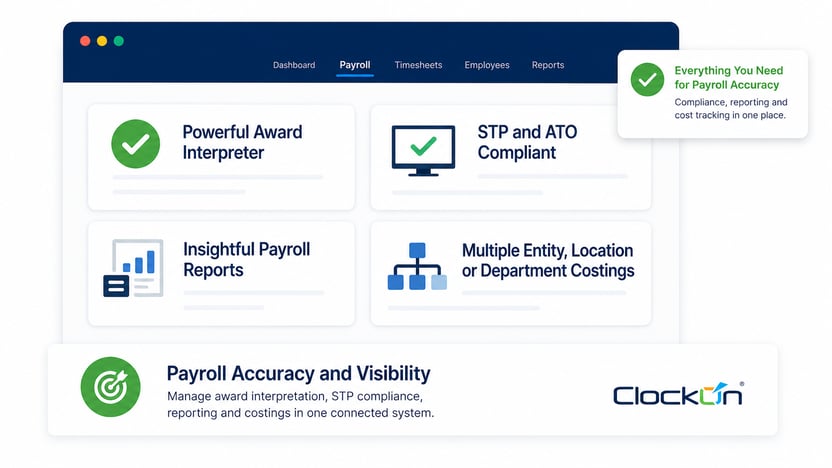
ClockOn's support documentation provides more detail than the marketing pages if you want to see how the underlying configuration works. The Award Manager, Award Templates, overtime configuration, allowance configuration and timesheet guides are useful places to look before a demo.
▶When is ClockOn likely to be a strong fit?
ClockOn is worth considering when several of these sound familiar:
- your employees work variable shifts
- weekend or evening work is common
- overtime needs regular checking
- allowances come up every pay cycle
- you have casual, part-time and full-time staff
- employees have different classifications
- managers currently approve timesheets before payroll
- you operate across several locations or departments
- payroll staff manually interpret worked hours
- roster, attendance and payroll data currently live in different systems
- payroll reconciliation takes longer than the actual pay run
Those conditions show up frequently in businesses such as pharmacies, retail groups, restaurants, clubs, medical practices, manufacturing and transport.
The industry label is less important than the shape of the workforce.
▶When might you not need this level of functionality?
ClockOn may be more than you need if:
- you have a very small workforce
- almost everyone is salaried
- working hours rarely vary
- employees generally work fixed weekdays
- few penalties or allowances apply
- there is little award interpretation to perform
- basic payroll and accounting integration solve the problem
In that situation, simpler payroll software may be faster to implement and easier to maintain.
That's not a weakness in the simpler product. It's a better fit for a simpler problem.
The bottom line: what payroll software should you choose?
If your workforce is straightforward, choose payroll software based on usability, reporting, integrations, support and price.
If pay changes according to when employees work, what they do, their classification, overtime thresholds, penalties or allowances, spend much more time looking at award interpretation and the connection between worked time and payroll.
The payroll screen is the end of that chain.
The quality of the inputs and rules before it are what determine whether the final number can be trusted.
For businesses in that second category, ClockOn is designed specifically around a connected roster, attendance, timesheet, award interpretation and payroll workflow.
Bring one of your complicated timesheets to a ClockOn demo and ask the team to show you how it would be handled.
That will tell you more than another 40-item software feature comparison.
Frequently asked questions
▶What payroll software is best for Modern Awards in Australia?
For businesses with complex Modern Awards, look for payroll software that combines worked-time data, award interpretation and payroll rather than judging products only on basic pay-run features. Shift-based businesses should test how the system applies overtime, penalty rates and allowances from real timesheets before choosing a platform.
▶Can payroll software automatically calculate penalty rates?
Yes, some payroll and workforce systems can apply configured penalty-rate rules using information such as working times, employment type and classification. The employer still needs to establish the correct Award, classification and payroll configuration. Fair Work notes that the applicable penalty rate depends on the Award covering the employee.
▶Can payroll software calculate allowances automatically?
Some systems can automatically trigger configured allowances when known conditions are met, while other allowances still require manual information. ClockOn's Award Template documentation, for example, distinguishes between system-calculated allowances and allowances that need to be entered manually.
▶Does payroll software automatically know which Modern Award applies?
No. Employers still need to establish the correct Award coverage and classification. Fair Work says Award coverage can depend on the employer's industry, the work the employee performs, coverage exclusions and the classifications contained in the Award.
▶Can one business have employees under different Modern Awards?
Yes. Fair Work confirms that one employer can be covered by more than one Award depending on the jobs its employees perform. For example, operational employees and administration staff within the same business may fall under different Awards.
▶What is award interpretation software?
Award interpretation software applies configured Award or agreement rules to relevant employee and workforce information to determine how pay conditions should be treated. Depending on the system and configuration, this can include ordinary hours, overtime, penalty rates, loadings and allowances.
▶Do I need time and attendance software for Modern Award payroll?
Not every employer does. Time and attendance becomes more useful when an employee's entitlements depend on when they started, finished, took breaks or exceeded working-hour thresholds. In those situations, accurate worked-time data can become an input to the payroll calculation rather than simply an attendance record.
▶Is outsourced payroll better than payroll software for complex Awards?
It depends on whether you want to maintain payroll capability internally. A configurable payroll platform suits businesses that want direct control of their pay runs. An outsourced payroll service can make more sense when the real constraint is payroll expertise, internal capacity or the time required to manage complex pay conditions each cycle.