
Payroll processing in Australia follows a repeatable sequence: collect and approve payroll inputs, calculate employee entitlements and gross pay, apply PAYG withholding and deductions, review the draft pay run, pay employees, report through Single Touch Payroll (STP), pay super and reconcile the results.
Since 1 July 2026, Payday Super has also made super a normal part of each pay cycle. Employers generally need employee super contributions to reach the employee's fund within seven business days of payday.
The Australian payroll process looks like this:
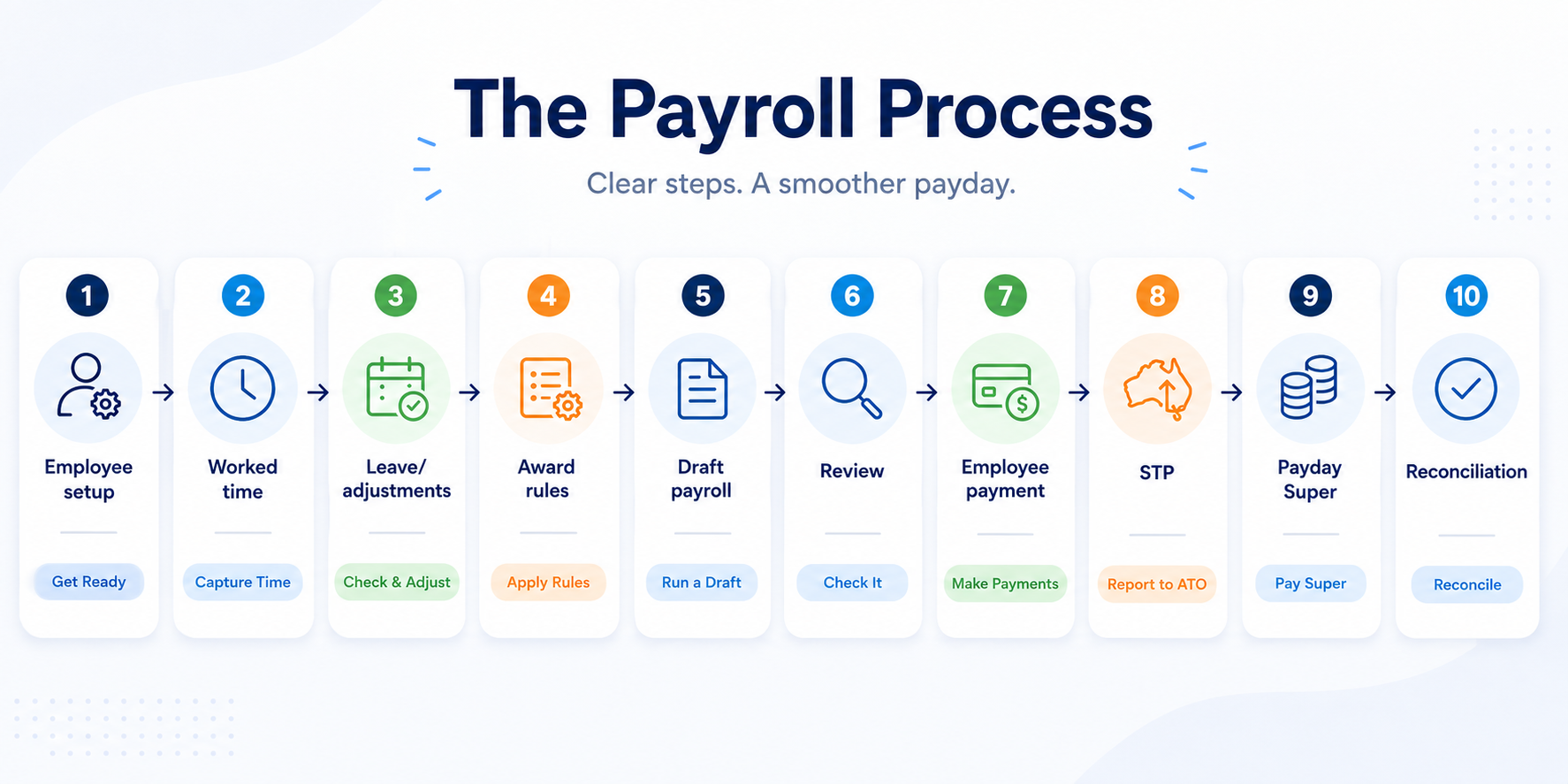
Employee details → Hours and leave → Pay rules → Gross pay → PAYG and deductions → Review → Employee payment → STP → Payday Super → Reconciliation
What Does It Actually Mean to Run Payroll?
Running payroll means turning employee work and entitlement information into the correct payment, reporting and payroll records for a particular pay period.
Payroll setup happens before the first pay run and includes employee details, tax information, super details, pay rates, classifications and applicable employment conditions. Running payroll is the recurring process completed each weekly, fortnightly or monthly pay cycle.
Payroll processing does not finish when net pay has been calculated. The complete process also includes paying employees, submitting required payroll information through STP, dealing with super contributions, issuing payslips and reconciling the pay run.
What Do You Need Before You Can Run Payroll?
Payroll setup needs to be correct before the first pay run because those settings determine how later payroll calculations behave.
▶What Employee Details Do You Need for Payroll?
Payroll employee records should contain the information required to calculate, pay and report the employee correctly.
Depending on the employee and payroll system, this commonly includes:
- Employee name and employment details
- Employment start date
- Full-time, part-time or casual status
- Tax file number information
- Bank details
- Super fund details
- Ordinary pay rate or salary
- Classification or pay level
- Allowances
- Authorised deductions
- Leave arrangements
- Applicable Award, agreement or employment conditions
Payroll errors caused by incorrect employee setup can continue across multiple pay runs. A wrong classification, pay rate or employment type can affect ordinary pay, overtime, penalties, leave and other entitlements.
▶Which Pay Rates and Employment Conditions Apply?
Australian payroll must reflect the employment conditions that actually apply to each employee, rather than treating recorded hours as the entire calculation.
Employees may be covered by a Modern Award, enterprise agreement, employment contract or other arrangement. Award-free employees are still subject to applicable minimum employment standards and minimum wage requirements.
Payroll entitlements can depend on factors such as:
- Employment type
- Classification and pay point
- Ordinary hours
- Overtime
- Weekend or public holiday work
- Shift penalties
- Casual loading
- Allowances
- Leave
- Minimum engagement periods
- Other Award or agreement conditions
Important: Recorded hours are not necessarily the same as payable entitlement. An employee can have an accurate timesheet but still receive the wrong pay if the relevant rule governing those hours is missing, outdated or incorrectly configured.
Strong payroll compliance therefore depends on both accurate payroll inputs and the correct employment rules being applied to them.
▶How Should You Set Your Payroll Calendar?
Payroll frequency should reflect the Award, enterprise agreement or employment conditions that apply to your employees.
Most Awards and agreements specify when employees need to be paid, commonly weekly, fortnightly or monthly. Where no applicable Award or agreement specifies the frequency, employees must generally be paid at least monthly.
A pay run calendar should define four dates clearly:
- Pay period start
- Pay period end
- Payroll cut-off
- Employee payday
Keeping these dates consistent makes timesheet approval, payroll review, STP reporting and Payday Super easier to manage.
▶What Payroll, STP and Super Processes Need to Be Ready?
Payroll software and payroll processes need a method for withholding PAYG, reporting STP, transferring employee wages and making SuperStream-compliant super payments.
From 1 July 2026, the super guarantee rate remains 12%, while Payday Super generally requires contributions to reach an employee's super fund within seven business days after payday.
Payday Super also introduced qualifying earnings into the payroll workflow. Employers now report employees' year-to-date qualifying earnings and super liability through STP each payday.
How Do You Run Payroll in Australia in 7 Steps?
Running payroll in Australia can be broken into seven practical steps from preparing payroll inputs through to reconciliation.
| Step | Payroll task | What to check | Output |
|---|---|---|---|
| 1 | Confirm the pay run | Dates, employees and changes | Correct payroll population |
| 2 | Approve payroll inputs | Timesheets, leave and adjustments | Complete payroll data |
| 3 | Calculate gross pay | Rates, overtime, penalties and allowances | Gross earnings |
| 4 | Calculate PAYG, deductions and super | Tax, deductions and qualifying earnings | Net pay and liabilities |
| 5 | Review the draft payroll | Variances and unusual payments | Approved payroll |
| 6 | Finalise and pay employees | Bank totals and payment file | Employee wages paid |
| 7 | Complete STP, super and reconciliation | Reporting, super, payslips and records | Completed pay cycle |
▶Step 1: How Do You Confirm the Pay Period and Employees Being Paid?
A pay run should start by confirming exactly which period and employees are being processed.
Check:
- Pay period start and end dates
- Employee payday
- Employees included in the pay run
- New employees
- Terminated employees
- Employees on extended leave
- Employment-status changes
- Pay-rate changes
- Classification changes
Payroll payment dates deserve particular attention because the payment date can determine which month or financial year a payroll belongs to and can affect payroll tax calculations within payroll software.
A useful check is to compare the current employee list against the previous pay run. Unexpected additions or missing employees should be investigated before processing continues.
▶Step 2: How Do You Approve Timesheets, Leave and Payroll Inputs?
Payroll accuracy starts with the information entering the pay run, not the payroll calculation itself.
Review payroll inputs such as:
- Clock-in and clock-out data
- Approved timesheets
- Breaks
- Leave
- Overtime
- Shift changes
- Bonuses
- Allowances
- Kilometres or expenses where applicable
- One-off adjustments
Timesheet payroll data should represent what actually occurred and then be interpreted using the employment conditions that apply.
For example, an employee may have been rostered until 5 pm but worked until 7 pm. The payroll process needs to capture the additional worked time and then determine how those hours should be paid.
ClockOn's timesheet payroll software can use worked-time information to generate normal, penalty and overtime costings at payroll, while time and attendance software helps capture the worked-time inputs feeding that process.
Where leave affects the pay run, approved leave management records should also agree with the payroll inputs being processed.
▶Step 3: How Do You Calculate Gross Pay?
Gross pay is the employee's earnings before PAYG withholding and other deductions are removed.
A simplified calculation is:
Gross pay = ordinary earnings + overtime + penalties + loadings + allowances + other applicable earnings
Payroll calculations become more complicated when different rules apply to different employees, shifts or types of work.
A casual employee may have a casual loading. Another employee may trigger overtime after a particular number of hours. Weekend work may attract a penalty. Some employees may also receive allowances triggered by specific conditions.
What Does a Simple Gross Pay Calculation Look Like?
Payroll calculations can be easier to understand when each earning component is separated.
Consider an illustrative employee paid $30 per hour:
| Component | Calculation | Amount |
|---|---|---|
| Ordinary hours | 38 × $30 | $1,140 |
| Overtime | 2 × $45 | $90 |
| Allowance | Fixed amount | $20 |
| Gross pay | $1,250 |
This example is illustrative only and is not based on a specific Modern Award.
Award interpretation should use the actual Award, classification, employment type and conditions that apply to the employee. ClockOn can use configured Rule Sets, Rate Sets and allowances to handle overtime, penalties and other payment conditions.
Employers using ClockOn's award interpretation should still verify that the rules and employee settings reflect their actual employment obligations.
▶Step 4: How Do You Calculate PAYG, Deductions and Super?
Payroll processing converts gross earnings into the employee's net payment while also calculating employer liabilities.
The basic sequence is:
Gross pay → PAYG withholding and deductions → Net pay
PAYG withholding depends on the employee's tax circumstances and information supplied through their tax declaration. Authorised deductions or salary-sacrifice arrangements may also affect the final payment.
Payday Super now needs to be considered alongside the normal pay run rather than left as a separate quarterly process.
From 1 July 2026:
- The SG rate is 12%
- SG is calculated using qualifying earnings
- Contributions generally need to reach the employee's fund within seven business days of payday
- Extended timeframes can apply in some situations
- Qualifying earnings and super liability form part of STP reporting each payday
ATO guidance should be checked whenever the treatment of a particular payment for super is unclear.
▶Step 5: What Should You Review Before Finalising Payroll?
Payroll review should happen while the pay run is still in draft rather than after money has already been transferred.
Check the overall payroll totals first:
- Employee count
- Gross wages
- Net wages
- PAYG withholding
- Super
- Overtime
- Allowances
- Leave payments
Payroll variances are often more useful than simply reading every number on screen.
Compare the current pay run with previous periods and investigate material changes.
For example:
- An employee normally earns about $1,500 gross but shows $900
- A regular casual normally works 20–25 hours but shows three
- Overtime has increased sharply
- An employee expected to be on leave has ordinary hours
- A recently terminated employee still appears
- An employee unexpectedly has a zero pay
Variance-based payroll review helps direct attention towards results that are unusual enough to justify checking.
Unusual results should be investigated while payroll is still in draft rather than after employees have been paid. The aim is not to prove that every unusual payment is wrong. It is to make unusual payments explainable before payroll is finalised.
ClockOn's payroll management tools are designed to support the recurring calculation, review and finalisation process.
▶Step 6: How Do You Finalise Payroll and Pay Employees?
A pay run can be finalised once the calculations and exceptions have been reviewed and approved.
The next step is transferring net wages to employees using the business's normal payment process.
Depending on the payroll system and bank, this may involve:
- Generating an ABA or banking file
- Uploading the file to online banking
- Reviewing the payment total
- Confirming employee bank accounts
- Confirming sufficient payroll funds
- Authorising the bank transaction
Payroll calculation is not the same as employee payment. A payroll system may calculate and finalise wages while the actual transfer of money occurs separately through the employer's banking system.
▶Step 7: What Happens After You Finalise Payroll?
Payroll finalisation is not the end of the pay cycle.
A completed Australian pay run normally still requires STP reporting, super processing, payslips and reconciliation.
When Should You Submit STP?
Single Touch Payroll reports employee payroll information to the Australian Taxation Office when employees are paid through STP-enabled software.
STP should therefore be built into the normal pay-run procedure rather than treated only as an end-of-financial-year task.
When Should You Pay Super?
Payday Super generally requires super contributions to reach the employee's super fund within seven business days after payday.
Employers should allow enough processing time for their clearing method and deal with rejected or incorrect contribution information promptly.
When Should Employees Receive Payslips?
Payroll payslips must generally be provided within one working day of payday, including when the employee is on leave.
Payslips must contain required information about the employee's pay, deductions, super and other applicable payment details.
Why Should You Reconcile Payroll?
Payroll reconciliation confirms that what was calculated agrees with what was actually paid, reported and recorded.
Check:
- Payroll register against bank payments
- PAYG liabilities
- Super liabilities and payments
- Accounting or general-ledger entries
- Failed payments
- Corrections
- Outstanding payroll liabilities
Reconciliation closes the loop between payroll calculation and the financial records of the business.
What Should You Check Before Finalising a Pay Run?
A payroll checklist should focus on the inputs and calculations most likely to produce material errors.
| Check | What to review | Common issue |
|---|---|---|
| Pay period | Correct start and end dates | Wrong period processed |
| Payment date | Correct payday | Wrong reporting period |
| Employee list | Starters, leavers and missing employees | Wrong employee paid |
| Timesheets | Missing or unapproved hours | Underpayment |
| Leave | Approved leave and balances | Duplicate or missing payment |
| Pay rates | Recent rate changes | Outdated rate |
| Classification | Current classification/pay point | Wrong entitlement |
| Overtime | Hours and trigger rules | Overtime omitted |
| Penalties | Nights, weekends and public holidays | Correct hours, wrong pay |
| Allowances | Automatic and manual allowances | Entitlement missed |
| Deductions | Amount and authorisation | Incorrect net pay |
| PAYG | Material anomalies | Unexpected withholding |
| Super | QE and SG calculation | Incorrect super liability |
| Gross pay | Compare with previous periods | Missing earning |
| Net pay | Review material movement | Duplicate or missing item |
| Bank details | Recent changes | Payment failure |
| Payroll funds | Bank balance | Payment delay |
| STP | Submission process | Payroll finalised but not reported |
| Super payment | Clearing process ready | Late contribution |
What Is the Employer's Job Versus the Payroll Software's Job?
Payroll software can automate calculations and repetitive processing, but employers still need to determine which employment conditions should apply.
| Payroll stage | Employer/payroll administrator | What software can automate |
|---|---|---|
| Employee setup | Determine correct employment details | Store employee records |
| Timesheets | Ensure hours are complete and approved | Capture and import time |
| Pay rules | Determine applicable conditions | Apply configured rules |
| Gross pay | Review calculated entitlement | Calculate configured earnings |
| PAYG | Maintain correct employee tax settings | Calculate withholding |
| Super | Confirm correct treatment and employee details | Calculate and process configured super |
| Review | Investigate unusual results | Produce reports and comparisons |
| Payment | Authorise transfer of funds | Generate payment information |
| STP | Ensure reporting is completed | Prepare and transmit STP data |
| Records | Maintain accurate payroll records | Store payroll history |
Payroll automation is strongest when the underlying employee information and pay rules are correct.
Software can consistently apply a rule that has been configured. It cannot independently decide that an employer has selected the wrong Award, classification or contractual arrangement.
What Does a Payroll Run Look Like in ClockOn?
ClockOn payroll follows the same general workflow as the Australian payroll process above, while connecting timesheets, employee settings, pay rules and payroll in one system.
This section is a worked example rather than a complete product manual.
▶How Do You Prepare Timesheets and Payroll Inputs in ClockOn?
ClockOn payroll can use employee timesheets when creating payroll costings.
ClockOn timesheets record rostered and worked time, and the system can convert that information into normal, penalty and overtime hours based on the rules that have been configured.
This connection matters because the payroll administrator does not need to manually rebuild every employee's worked hours inside payroll.

▶How Do You Create a Draft Payroll in ClockOn?
ClockOn payroll starts from the Payroll or Process Payroll option.
The documented ClockOn Online workflow is:
- Open Payroll or Process Payroll
- Select Create
- Choose the relevant Payroll Pay Period
- Select Create
ClockOn then creates the payroll in draft mode, allowing it to be reviewed before processing.

▶What Can You Review Inside a ClockOn Draft Payroll?
ClockOn payroll shows employees included in the selected pay period and the amounts currently calculated for each employee.

Payroll administrators can inspect underlying information before finalisation, including timesheets and detailed payslip calculations.

Employee payroll settings can also include the relevant Award grouping, Rule Set, Rate Set and employee allowances.
▶How Does ClockOn Apply Award and Payroll Rules?
ClockOn award interpretation uses configured Rule Sets to convert worked time into payroll costings such as normal hours, overtime and penalty hours.
Rule Sets can contain conditions governing overtime, penalties and loadings, leave and other payroll settings.
ClockOn also provides Award templates for selected Awards, but these are a starting point. Employers still need to confirm that the applied rates, rules, allowances and conditions suit their employees and circumstances.
▶How Do You Process and Finalise Payroll in ClockOn?
ClockOn payroll remains editable while it is being reviewed in draft mode.
Once the payroll administrator is satisfied with the amounts, the payroll can be processed to finalise the pay run.

ClockOn's payroll management tools support this recurring calculation and review process.
▶Does Finalising Payroll in ClockOn Automatically Submit STP?
Important: ClockOn payroll does not automatically submit STP when payroll is processed.
After the payroll has been finalised, the payroll administrator still needs to complete the separate Single Touch Payroll submission process. ClockOn's current support documentation explicitly distinguishes payroll processing from the STP submission.
That distinction is important because “payroll processed” and “payroll reported to the ATO” are two separate checkpoints.

▶How Does Payday Super Work in ClockOn?
ClockOn Payday Super is available through its current Beam clearing-house integration for paying ClockOn users.
The integration allows eligible customers to create, process and manage super submissions from ClockOn. Starter users can access super reports but need a separate clearing-house arrangement.

Interactive walkthrough: Create and submit super fund payments using Beam
The interactive ClockOn walkthrough shows how a Beam super submission is created, reviewed and processed from the super payments workflow. Source: ClockOn Online Knowledge Base.
This means the recurring ClockOn workflow can now extend from worked hours and payroll through to STP and super processing.
What Are the Most Common Payroll Mistakes?
Payroll mistakes often happen before the final calculation rather than because someone typed the final number incorrectly.
Common problems include:
- Paying rostered hours instead of approved worked hours
- Using the wrong employee classification
- Leaving outdated pay rates in place
- Missing overtime triggers
- Missing weekend or public-holiday penalties
- Missing applicable minimum-engagement rules
- Forgetting allowances
- Using the wrong employment type
- Applying one payroll rule to employees with different conditions
- Missing payroll variances
- Using the wrong payment date
- Finalising payroll but forgetting STP
- Paying super too late
- Missing payslips
- Failing to retain sufficient payroll records
▶Why Can Correct Timesheets Still Produce Incorrect Pay?
Payroll accuracy depends on both worked-time data and the rules applied to that data.
A timesheet might correctly record that an employee worked three hours. If an applicable employment condition requires a different minimum payable entitlement, paying only the recorded hours may still produce the wrong outcome.
The practical control is to check both sides of the calculation:
What happened → What employment rule applies → What should be paid
▶Why Should Payroll Teams Review Variances?
Payroll variances can reveal errors that ordinary line-by-line review misses.
A payroll result that differs materially from an employee's normal pattern does not automatically mean something is wrong. It does create a useful reason to investigate.
A good payroll review therefore asks:
“Can we explain why this amount changed?”
That is more useful than simply asking whether the payroll software completed its calculation.
What Payroll Records Should Australian Employers Keep?
Payroll records for employee time and wages generally need to be retained for seven years under Fair Work requirements.
Records must generally be accessible, legible and in English. They must not be false or misleading and should only be altered when correcting an error.
Depending on the employee and circumstances, payroll records can include information about:
- Wages
- Hours worked
- Overtime
- Leave
- Super contributions
- Employment details
- Termination
- Applicable employment arrangements
- Payroll adjustments and corrections
Payroll audit readiness means being able to reconstruct how an employee's final payment was produced.
A useful payroll trail should answer:
What was worked → Which rules applied → What was calculated → What was approved → What was paid and reported
Should You Run Payroll Yourself, Use Payroll Software or Outsource It?
Payroll processing can be managed internally, through payroll software or with an outsourced payroll provider.
The right approach depends on workforce size and complexity rather than one option being universally better.
| Approach | Best suited to | Advantages | Limitations | When to reconsider |
|---|---|---|---|---|
| Manual/admin-led | Very small, simple payrolls | Direct control | High manual workload | Complexity or employee numbers increase |
| Payroll software | Businesses with internal payroll capability | Repeatable calculations and records | Setup and review remain important | Internal capacity becomes constrained |
| Outsourced payroll | Businesses wanting payroll handled externally | Reduces internal processing burden | Employer still supplies accurate information | More internal control becomes desirable |
Payroll complexity should be assessed using factors such as:
- Employee numbers
- Number of locations
- Modern Award complexity
- Employment types
- Overtime and penalties
- Number of allowances
- Pay frequency
- Volume of timesheets
- Internal payroll expertise
- Review capacity
- Payroll continuity and key-person risk
Businesses that want to retain payroll internally can use payroll software, while businesses wanting the process managed externally can consider outsourced payroll services.
How Can ClockOn Simplify the Payroll Workflow?
ClockOn payroll connects several stages that would otherwise need to be reconciled between separate systems or spreadsheets.
The workflow can connect:
Rostering → Time and attendance → Award and pay rules → Payroll → STP → Payday Super
ClockOn's rostering software and time and attendance tools can feed worked-time information into the payroll process.
ClockOn payroll can then apply configured Rule Sets and pay settings, keep the payroll available for review in draft mode, process payroll and support the subsequent STP and Beam super workflows.
The benefit is not that payroll no longer needs checking. It is that the data, rules and calculations behind the pay run can remain connected and reviewable.
See how ClockOn's payroll software connects employee time, pay rules and payroll, or compare it with outsourced payroll if you would prefer the pay run to be managed for you.
Frequently Asked Questions About Running Payroll in Australia
▶How Do You Run Payroll in Australia?
Running payroll in Australia involves collecting approved employee hours and payroll inputs, applying the correct pay rules, calculating gross pay, PAYG, deductions and super, reviewing the draft payroll, paying employees, submitting STP, processing Payday Super, issuing payslips and reconciling the pay run.
▶What Do You Need Before Running Payroll for the First Time?
Payroll setup should include employee details, tax information, bank and super details, employment type, pay rate, classification, applicable Award or agreement conditions, PAYG withholding settings and an appropriate STP reporting process.
The employee and payroll rules should be checked before recurring pay runs begin.
▶Do Australian Businesses Need Payroll Software?
Payroll software is the normal way for employers to manage calculations and STP reporting, but businesses can also use appropriately authorised payroll or reporting providers.
ATO guidance states that STP reports employee payroll information each time employees are paid through STP-enabled software.
▶How Often Should Australian Employees Be Paid?
Payroll frequency depends primarily on the Award, enterprise agreement or other employment conditions that apply.
Most Awards or agreements specify weekly, fortnightly or monthly payment. If they do not specify a frequency, employees must generally be paid at least monthly.
▶When Do You Need to Submit STP?
Single Touch Payroll reporting is linked to paying employees and should form part of the recurring pay-run process.
Employers using STP report payroll information to the ATO each time employees are paid through STP-enabled software.
▶When Does Super Need to Be Paid Under Payday Super?
Payday Super applies from 1 July 2026 and generally requires employee super contributions to reach the employee's super fund within seven business days after payday.
Extended timeframes apply in some circumstances, so employers should check current ATO guidance for exceptions.
▶How Long Should Australian Employers Keep Payroll Records?
Payroll records covering employee time and wages generally need to be kept for seven years.
Fair Work also requires records to be accessible, legible and in English, and they must not be false or misleading.
▶What Should You Check Before Finalising Payroll?
Payroll review should cover the employee list, timesheets, leave, pay rates, classifications, overtime, penalties, allowances, deductions, PAYG, super and material changes from previous pay runs.